
Export and duplicates
Download your CRM records as CSV files, merge contacts saved twice, and decide whose conversation an unmatched chat is.
What this does
The Export CRM data card in the Small Business Chatbot CRM settings downloads your records as CSV files. The Needs review tab holds decisions for you to make: contacts that share a phone or email, and chats whose details don't clearly match one contact. Nothing there changes until you confirm.
Export your records
- Open the export
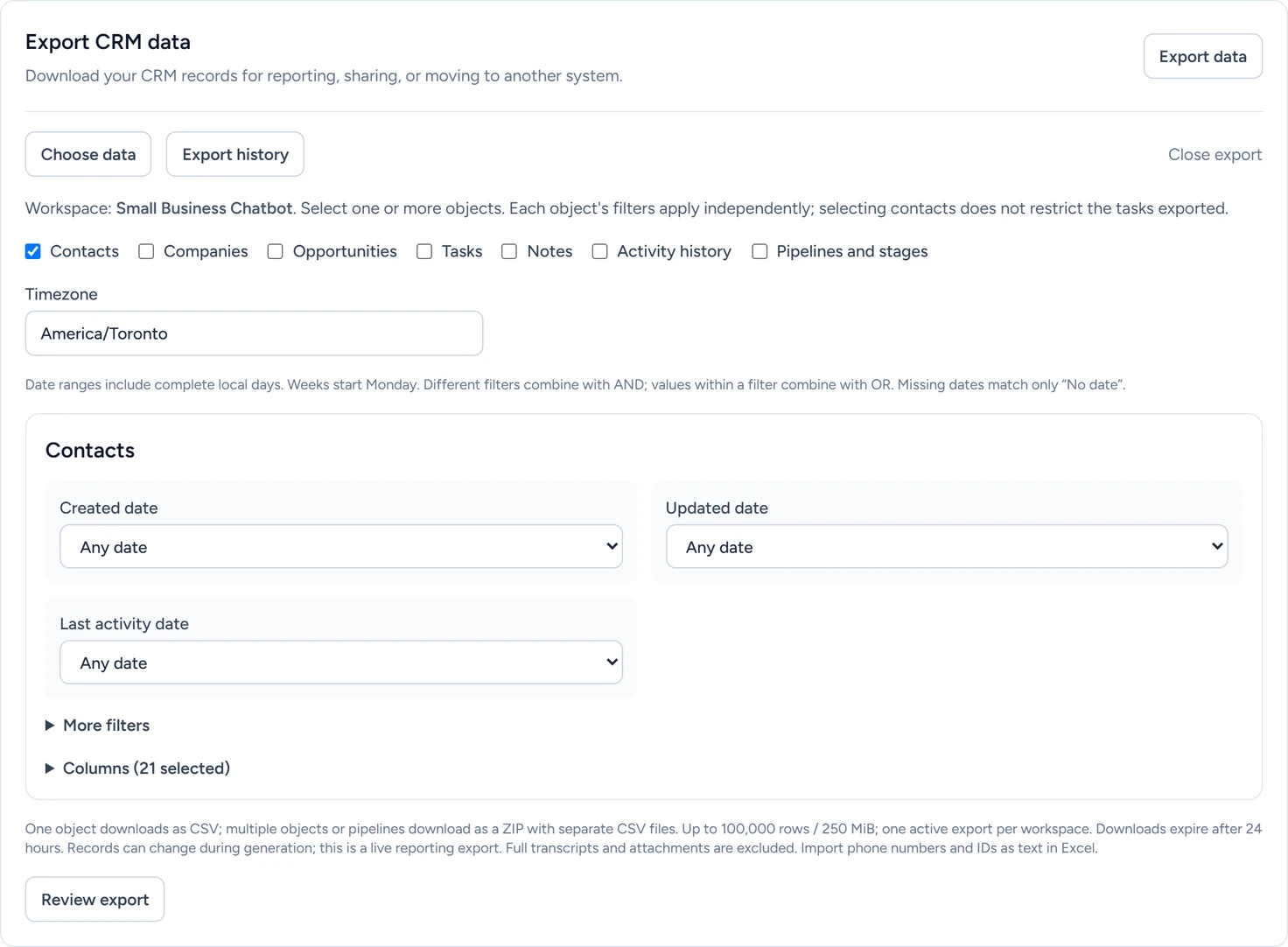
In the app, open CRM › Contacts, click the Settings tab, then click Export data on the Export CRM data card.
CRM › Contacts › Settings, October 2026 - Choose the records
Tick one or more of Contacts, Companies, Opportunities, Tasks, Notes, Activity history and Pipelines and stages. Check the Timezone, which the date filters use.
- Filter and pick columns
Each record type has its own date filters, More filters such as status, tags or archived records, and Columns. A filter on one type leaves the other types as they are.
- Review the export
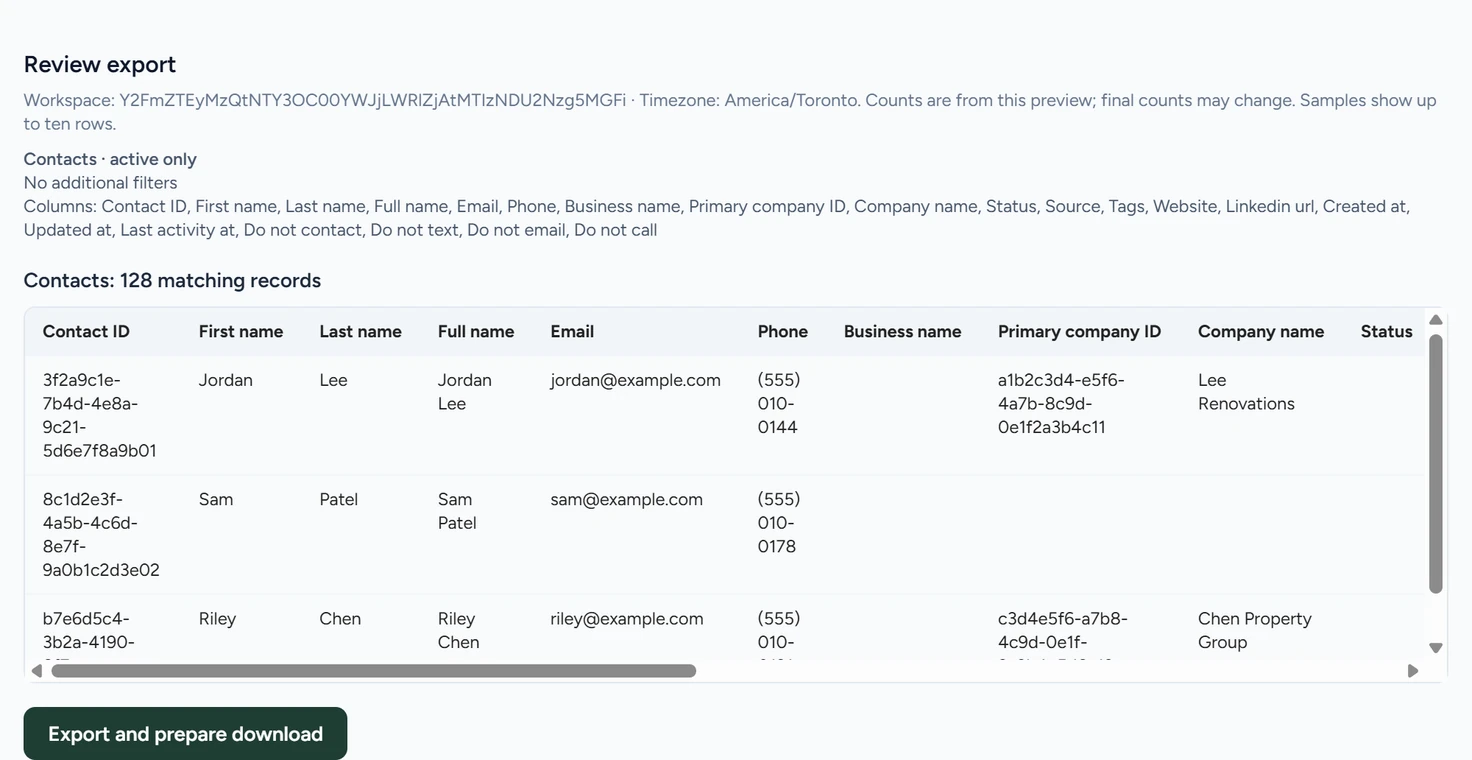
Click Review export. This is a preview: the app shows how many records match each type, with up to ten sample rows. The file is made in the next step.
CRM › Contacts › Settings, October 2026 - Download it
Click Export and prepare download to create the file. Export history opens. When the export reads Ready, click Download.
One record type downloads as a CSV file. Several record types, or Pipelines and stages on its own, download as a ZIP of CSV files. An export holds up to 100,000 rows, one export runs at a time, and a download link expires after 24 hours. Use choices again reloads an earlier export's choices.
When you open the file in Excel, import phone numbers and IDs as text so they keep every digit.
Merge duplicate contacts
The Needs review tab appears next to Contacts when something is waiting, with a count beside it.
- Open Needs review
In the app, open CRM › Contacts and click Needs review. Under Duplicate contacts, each group names the email address or phone number its contacts share.
- Pick the contact to keep
Click the contact to keep. The app counts the opportunities, notes, tasks, activity records and conversations that will move onto it.
- Merge
Click Merge N duplicates, then confirm. The other contacts leave your list, and everything saved on them moves to the one you kept.
A merge is permanent.
If more than one of the contacts is in an active sequence, choose the one to keep under Active sequence impact. The others stop and their open tasks are cancelled.
The kept contact keeps every opt-out box that was checked on any of the merged contacts. Opt-outs and STOP covers those boxes.
Link a conversation to a contact
Under Conversations to link, each card is a chat whose details didn't clearly match one contact. Why this needs review gives the reason. Pick an option, then click the button under it.
| Option | What happens | Button |
|---|---|---|
| Link to a listed contact | The conversation moves to that contact. Later chats from this visitor link there on their own. | Link conversation |
| Create a new, separate contact | A new contact is made for this visitor. | Create new contact |
| Leave unlinked | The conversation stays out of the CRM, and the app stops suggesting these contacts for this visitor. | Leave unlinked |
If several people share the email or phone, such as a family or office inbox, tick the box under the options. The app then stops using it to match the listed contacts, other than one you link to.
Move records to another CRM
To move your records once, export them here and import them in the other CRM. To keep sending new ones, use an HTTP request step or Zapier.
If something goes wrong
| What you see | Why | What to do |
|---|---|---|
| Choose at least one object. | No record type is ticked. | Tick at least one record type. |
| No records match. Adjust the filters before exporting. | The filters leave nothing. | Remove a filter or widen a date range. |
| Too many records. Narrow the filters to stay within the export limit. | More than 100,000 rows match. | Export one record type or a shorter date range at a time. |
| Choose which active sequence to keep before merging these contacts. | More than one of the contacts is in a running sequence. | Pick one under Active sequence impact, then merge. |