
Changelog
What's new in Small Business Chatbot, newest first.
-
October 27, 2026
Google Analytics Integration
- The chats, phone calls, texts, leads and appointments the AI receptionist handles now show up as events in your own Google Analytics 4 property.
- If your website already runs Google Analytics or Google Tag Manager, the chat widget reports three events to it with no setup: a visitor opened the chat, sent their first message, or left their details. Each event stays in the visitor's session, so the source and campaign that brought them are kept.
- To see calls, texts, CRM leads and appointments too, open Integrations, then Google Analytics, and paste your GA4 Measurement ID and a Measurement Protocol API secret. Press Send test event and a test event appears in GA4 within a minute.
- Every event starts with sbc_ and carries only the channel, ids, counts and the lead quality score. Names, emails, phone numbers and transcripts are never sent.
- Mark an event like sbc_appointment_booked as a key event in GA4 and it counts as a conversion in your reports and in Google Ads.
-
September 7, 2026
Keyword-Based Spam Protection for Voice AI
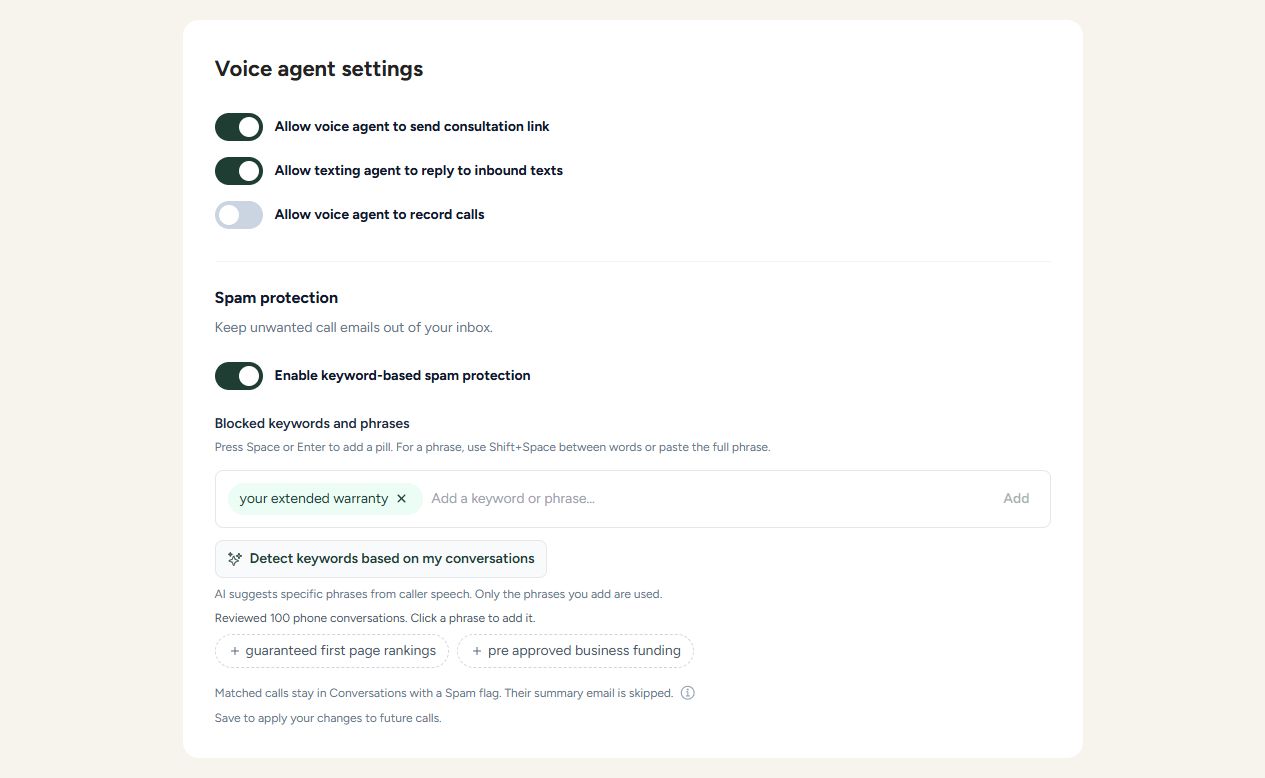
- Keep unwanted call-summary emails out of your inbox with the new Spam protection switch in voice settings, just below call recording.
- Add your own keywords or phrases, or click Detect keywords based on my conversations. AI reviews caller speech from your latest 100 phone conversations and suggests specific, longer phrases chosen to minimize false positives. Click a suggestion to add it; nothing is enabled automatically.
- When a caller says an exact saved keyword or phrase, the conversation is marked Spam, its summary email is skipped, and the reason is logged. The call continues normally and its transcript stays in Conversations.
- Matching ignores capitalization and extra spaces, checks whole words, and never checks the AI agent's replies. AI replies are also excluded when generating suggestions.
- Keywords appear as removable pills. Press Space or Enter to add one, use Shift+Space or paste to enter a longer phrase, and click the X to remove it. Save your settings to apply changes to future calls.
-
August 24, 2026
AI Appointment Booking Release
- The chat agent now books, cancels, and reschedules appointments right in the conversation, using live calendar availability.
- Every connected calendar gets a public booking page with a shareable link, timezone-aware times, and double-booking protection.
- The AI receptionist can text your booking link to callers mid-call, so they book while your business is top of mind.
- Invitees reschedule or cancel on their own through secure links in the calendar invite, inside the cutoff rules you set.
- New appointment triggers send confirmation and reminder texts and emails through one-click workflow starters.
- Reminders stop automatically on cancellations, retime automatically on reschedules, and every change lands on the CRM contact's timeline.
-
August 6, 2026
New CRM Release
- A full CRM is now available with contacts, companies, and opportunities.
- Our AI agents and workflows (chat, voice, text, email, appointments, and more) now sync up to the CRM automatically.
- Get AI agents to automatically screen for low-quality leads and organize your pipeline around the highest-quality ones.
- Track every deal on visual pipeline boards with customizable stages and win percentages, from new lead to won.
- Every call, text, email, note, task, and appointment lands on the contact's activity timeline without manual data entry.
- Import your existing contacts with a guided CSV import, and keep notes and tasks on any contact, company, or opportunity.
-
July 29, 2026
Workflows Can Enrol Each Contact Only Once
- Turn on Only enrol each contact once in workflow settings for any sequence that should reach a person a single time, like a new-lead welcome cadence, a first-booking follow-up, or a review request.
- If a customer fills in a form again, gets re-tagged, or books another appointment, they will not receive the same run of texts, emails, or AI calls twice.
- Every blocked attempt still shows in the workflow's execution records as Blocked due to re-enrol with the contact's details, so your team can always see the trigger fired and why nothing was sent.
-
July 8, 2026
AI Answering Service Human Transfers
- Use this when your AI answering service should handle normal calls automatically but still hand off callers who directly request a human.
- Add the human transfer number in voice settings, turn the transfer option on, and the AI can connect the caller to your team during the live call.
-
July 1, 2026
Workflow Testing, Execution Contacts, And Email Replies
- Use fast-forward when testing follow-up cadences, appointment reminders, or other workflows with wait steps, without sitting through the full delay.
- Review the contact column in execution records to quickly confirm which lead or customer is inside a workflow run.
- When a customer replies by email, your team can receive the reply directly instead of needing to hunt through workflow logs first.
-
June 25, 2026
Text Extractor For Workflow Data
- Use this when your team needs to extract a link, ID, confirmation number, proposal URL, or other value from data returned by another system.
- For example, a workflow can fetch notes or records from another system, extract the newest matching link, and send it to the customer in a follow-up text or email.
-
June 24, 2026
Custom Chat Widget Videos And Images
- Use this to make the chat widget feel more native to your website by showing a real team member, branded image, product photo, or service-specific visual before a visitor opens the chat.
- Teams that already use a custom widget video can now use the same style of customization with a still image when that is the better fit.
-
June 22, 2026
Duplicate Workflow Actions And Full Workflows
- Use Duplicate another Node when you want to reuse a configured email, text, wait, HTTP request, or other action later in the same workflow without re-entering every setting.
- Use Duplicate workflow when you want to clone a proven cadence for another lead source, service line, or customer segment while keeping the original workflow and run history unchanged.
-
June 19, 2026
Replay Workflows From The Execution Tab
- Use this when you are editing a workflow and want to test the latest version without manually rebuilding the trigger.
- Open the execution tab, press the cycle replay button, and review the new run to confirm the workflow is doing what your team expects.
-
June 17, 2026
Inbound SMS Texting Agent Toggle
- Use this when your team wants to manually handle text conversations for a period of time while keeping the phone number and SMS connection active.
- Turn it back on when you want the AI texting agent to resume instant replies to inbound customer texts.
-
June 17, 2026
Full Job Progress Integration Now Available
- Use the Job Progress integration to automate follow-up after leads, estimates, proposals, invoices, and job-status changes.
- Home service business owners can keep customers moving from inquiry to signed proposal to paid invoice with fewer manual reminders and more timely AI-assisted outreach.
-
June 11, 2026
Workflow Follow-Ups Can Stop When A Customer Replies
- Use this when you want outbound text follow-ups or outbound email follow-ups to stop as soon as a lead answers.
- It helps your outbound email and text sequences feel more natural and avoids sending unnecessary messages to customers who have already replied.
-
May 12, 2026
New 'Deep Search' Tool For Big Websites
- Best for online stores or websites with hundreds or thousands of pages, where it's hard for the chatbot to remember every single product or detail.
- Helps customers get answers about a specific product, page, or detail that might be buried deep in your site.
- You can turn Deep Search on or off anytime from the Tools page in your settings.
-
March 14, 2026
Revenue Workflows And Built-In CRM Release
- The platform now has the ability to create AI workflows that help you capture more revenue across your operations.
- Workflows allow you to connect to most APIs that you can use for various operations.
- Chat widget and Voice AI conversations can now have automatic follow-ups to help make sure leads book appointments or receive strong customer service.
- Small Business Chatbot now connects to most CRMs with inbound webhooks as a new workflow trigger.
- Outbound texts, email, and outbound AI voice calls are now available across all operations.
- Outbound communications can be limited to office hours so prospects are not reached out to inappropriately.
- A new lightweight CRM has been added to Small Business Chatbot so leads can be tracked automatically as they come in.
-
March 3, 2026
Knowledge AI Agent Release
- Teams can deploy a dedicated knowledge agent on key pages so visitors get answers immediately.
-
March 1, 2026
Lead Grading For Chat Widget
- When enabled, each completed chat can include an A-D lead score to prioritize follow-up.
- Teams can triage high-intent conversations faster without changing their existing summary workflow.
-
February 3, 2026
Add Photos To Chat Widget
- Businesses can collect issue photos and visual context directly from prospects before follow-up.
- Teams can request screenshots or product photos in-chat to speed up qualification and troubleshooting.