
Spam protection
Flag calls whose callers say your spam words or phrases, so their summary emails stay out of your inbox.
What this does
Spam protection in Small Business Chatbot checks what each caller said against the words and phrases you list. It checks calls the AI receptionist answers and AI calls your workflows place. A call that matches is flagged as spam in Conversations, and its summary email is skipped. The call itself goes on as normal.
Set it up
- Open the section
In the app, open Voice Agent › Settings and go to Spam protection, under the switches.
- Switch it on
Turn on Enable keyword-based spam protection.
- Add words and phrases
Under Blocked keywords and phrases, type a word and press Space or Enter, or click Add. Each one becomes a pill. For a phrase, press Shift+Space between the words, or paste the whole phrase. The × on a pill removes it.
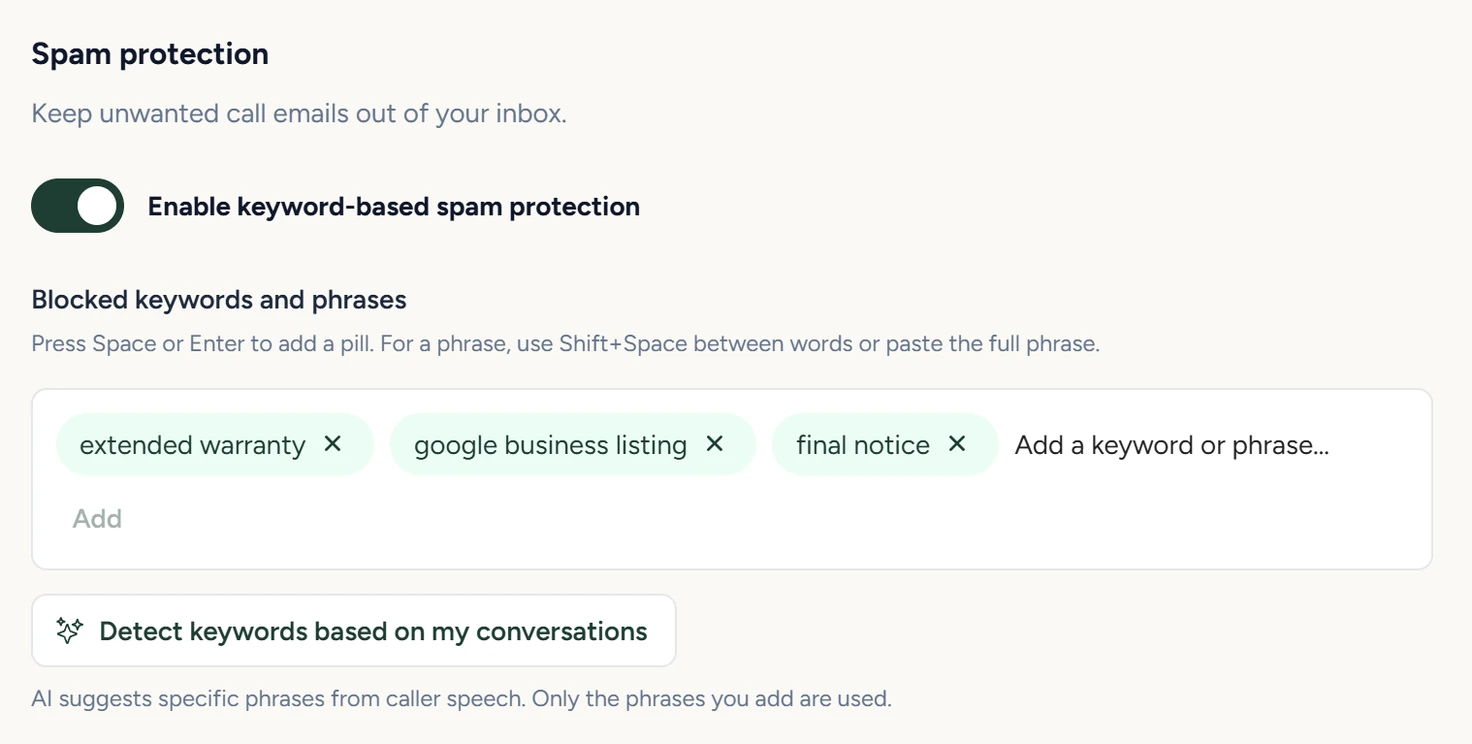
Voice Agent › Settings, October 2026 - Ask for suggestions
Optional. Click Detect keywords based on my conversations. The app reviews your last 100 phone conversations and lists phrases taken from callers' words. Click a phrase to add it. Only the phrases you add are used.
- Save
Click Save at the bottom of the panel. The list applies to calls after the save.
How matching works
- Only the caller's words are checked and used for suggestions.
- A keyword matches whole words, ignoring capitals and extra spaces. "car warranty" matches a caller who says "Car Warranty". Add each form you want caught: "warranty" and "warranties" are separate keywords.
- One match flags the call.
What a flagged call looks like
The Conversations list shows the call with a Spam label. Open it and a box reads Spam · Call-summary email skipped, then Matched caller keywords: with the words that matched, then "This conversation was kept and the email suppression was logged."
A flagged call is still answered and saved to Conversations and the CRM, and still starts workflows and Zapier triggers that run when a call ends. Only the summary email is skipped. Call transcripts and summaries covers what each call saves.
Settings
Enable keyword-based spam protection
Off by default. While it is off, your saved words stay in the list, ready for when you turn it on.
Blocked keywords and phrases
Up to 100 words or phrases, 160 characters each. They are saved in lower case.
Detect keywords based on my conversations
Reviews up to your last 100 phone conversations and suggests up to 12 phrases of 3 to 20 words, each copied from one caller's words. It picks long, specific phrases to avoid flagging real customers. When nothing is safe to suggest, the panel says "No new phrases were safe enough to suggest."
If something goes wrong
| What you see | Why | What to do |
|---|---|---|
| A real customer's call was flagged | One of your words is too general. | Open the call, read Matched caller keywords, and remove that word or replace it with a longer phrase. |
| A spam call's email still arrived | The caller didn't say the phrase word for word, protection was off, or the list wasn't saved. | Copy the exact phrase from the transcript into the list and click Save. |
| Use up to 100 keywords, with no more than 160 characters each. | The list is full, or the phrase is too long. | Remove words you no longer need, or shorten the phrase. |
| Could not suggest keywords right now. Please try again. | The suggestion request failed. | Click Detect keywords based on my conversations again later. |