
Inbound webhook
Start a workflow when another system sends a request to its own URL, and map the fields it sends into workflow variables.
What this does
In Small Business Chatbot, each Inbound Webhook trigger has its own web address. When another system sends a POST request to it, the workflow starts a run with the request's data.
- Label in the app
- Inbound Webhook
- Fires
- When a POST request reaches the trigger's URL while the workflow is published
- Carries
- The request body, or the fields your mapping rules pick, as
{{trigger.…}} - Settings
- Webhook URL, Capture incoming sample requests, Mapping reference, Mapping rules
Settings
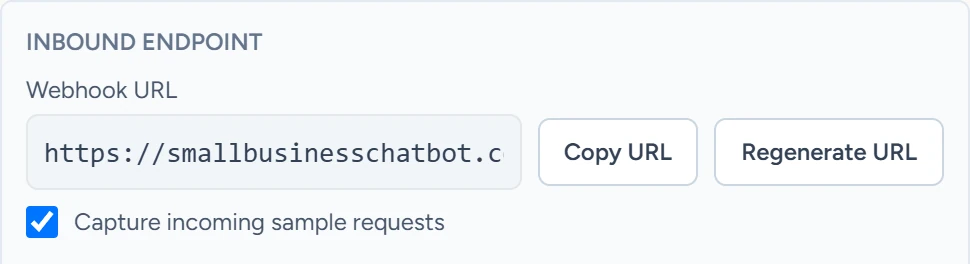
Webhook URL
The address to send requests to, in the form https://smallbusinesschatbot.com/workflow/webhooks/ followed by a random id. Copy URL copies it. Regenerate URL makes a new id and clears the samples and Mapping reference; the old address stops working once you click Save workflow. The URL is the only key: anyone who has it can start the workflow.
Capture incoming sample requests
Ticked by default. Keeps the last 20 requests on the trigger. Click Fetch sample requests to list them, newest first.
Mapping reference
A note for yourself, such as a sample's id. Use latest sample fills in the newest sample's id.
Mapping rules
Each rule copies one value from the request into the workflow. Add mapping rule adds one, and Remove rule deletes it.
| Field | What it does | Example |
|---|---|---|
| Source path | Where the value is in the request, with dots between levels. Numbers step into lists. | customer.email, value.0.action |
| Target path | Where it lands under trigger |
lead.email |
| Default value | Used when the source path isn't in the request | [email protected] |
When it fires
- Only while the workflow is published. Send test requests after you publish, and expect them to start real runs.
- Only for POST requests. A request to a draft workflow's URL, or an old URL, gets a "not found" reply.
- A request whose
Idempotency-KeyorX-Idempotency-Keyheader this workflow has seen before returns the first run instead of starting a second one.
What it carries
Without mapping rules, trigger is the request body:
| The request sends | It arrives as |
|---|---|
| A JSON object | Each field at trigger.<field>, such as {{trigger.customer.email}} |
| A JSON list or single value | trigger.value |
| Form fields | Each field at trigger.<field> |
| Plain text | trigger.raw_body, or the fields when the text is a JSON object |
With mapping rules, trigger holds only the target paths. A rule with Target path lead.email gives {{trigger.lead.email}}. The whole request body is still there, at {{data.trigger_raw.<field>}}.
Put every value in the request body. The run and the sample list receive the body, without headers or the query string.
Map the person's details to contact.email, contact.phone and contact.first_name. The run then has a contact: it shows in the Contact column under Executions, and Stop workflows when contact replies and Only enrol each contact once can match it.
The reply
| Result | Reply |
|---|---|
| Run started | 200 with execution_id, workflow_id and trigger_node_id |
Repeat of an Idempotency-Key |
200 with the first run's execution_id and "idempotency_reused": true |
| Workflow not published, or URL regenerated | 404, "Webhook endpoint was not found" |
| Account without workflow access | 403 |
| 100 runs already in progress | 409, "Workflow execution limit reached" |
Example
A form tool sends:
{ "name": "Jordan", "email": "[email protected]", "service": "Drain cleaning" }
With no mapping rules, a Send Email step can use {{trigger.email}} in To and {{trigger.service}} in Subject.
Used in
- Inbound webhooks: connect a form or another tool step by step.
- Triggers: how to pick a trigger.
- HTTP request: send data the other way.