
AI Agent
The AI Agent step's fields, what the AI sees, its tools, its text and schema outputs, and how to branch on its answer.
What this does
AI Agent sends the messages you write to an AI model and saves its answer for later steps. A common use is a yes-or-no question about the run, such as "Is this lead ready to book?", followed by an If step on the answer. In Small Business Chatbot the step can also read the run's data and make web requests while it works.
- Where
- Workflows › a step's Node settings › Node type: AI Agent
- Needs
- nothing
Fields
| Field | What it does | Default or options |
|---|---|---|
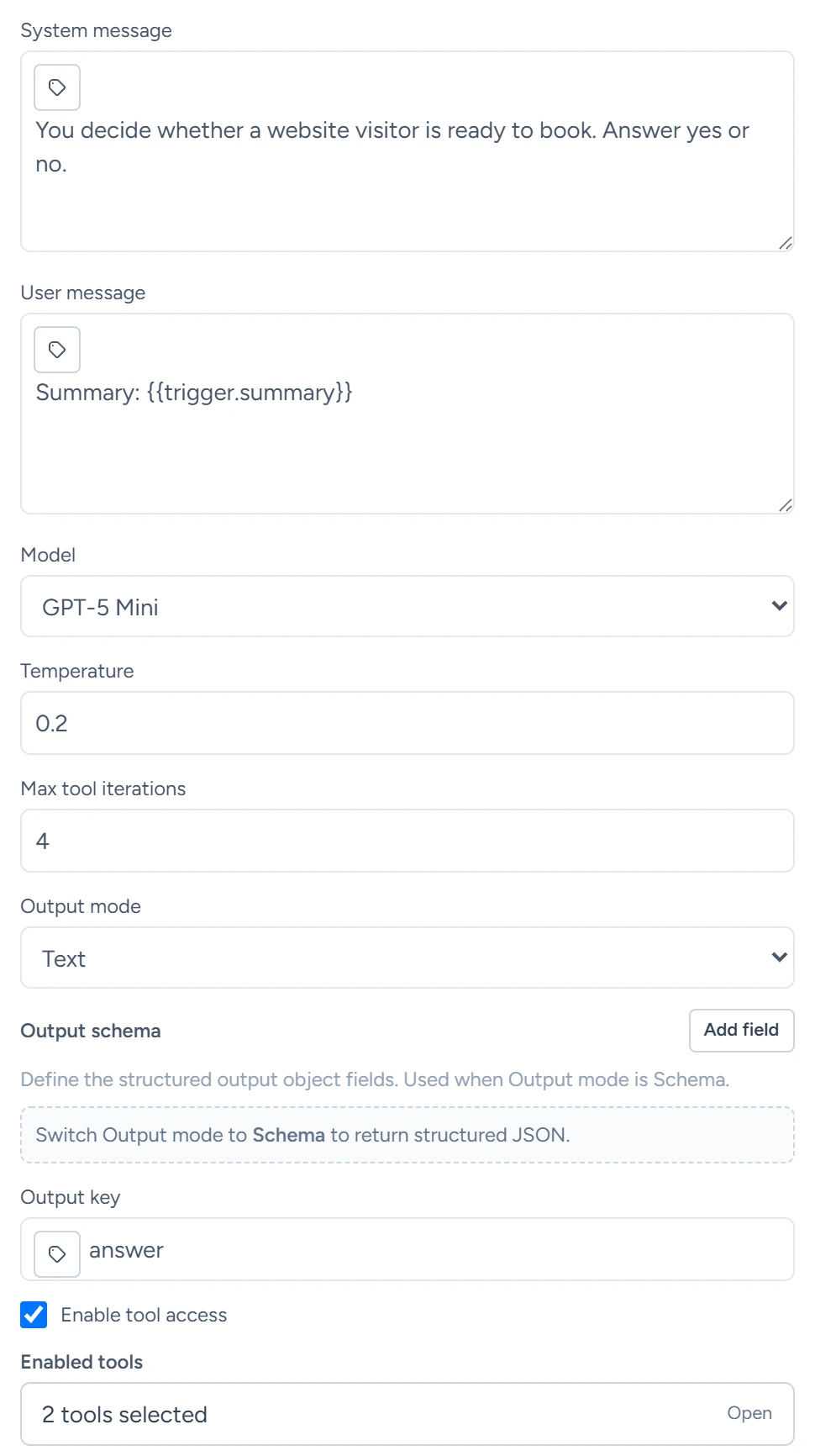
| System message | Instructions the AI follows, such as how to answer. | Empty |
| User message | The question or task. Put the run's data in it with variables, such as {{trigger.summary}}. |
Empty. Blank sends "Review the workflow context and provide the best possible answer." |
| Model | The OpenAI model that answers. | GPT-5 Mini. Options: GPT-5.2, GPT-5.1, GPT-5, GPT-5 Mini, GPT-5 Nano, GPT-5 Chat Latest, GPT-4.1, GPT-4.1 Mini, GPT-4.1 Nano, GPT-4o, GPT-4o Mini |
| Temperature | How much the wording varies between runs. Lower is steadier. | 0.2. A value of 0 is read as 0.2. |
| Max tool iterations | How many times the step may ask the model before it stops. Each tool round is one. | 4. The most is 12. |
| Output mode | Text saves the answer as text. Schema asks for the fields you list and saves them as an object. | Text. Options: Text, Schema |
| Output schema | With Schema: the fields to return. Add field adds a row with Field key, Type, Required and Description. | No fields. Types: Text, Number, Boolean, Object, Array |
| Output key | An extra name the answer is saved under. | answer |
| Enable tool access | Lets the AI use the tools checked below. | On |
| Enabled tools | The tools the AI may call. | Workflow Path Lookup and Workflow HTTP Request on. Workflow Firecrawl Read off. |
| Memory user path | A path in the run's data added to the messages as earlier user text, when it has a value. | trigger.user_message |
| Memory system path | A path in the run's data added as earlier instructions, when it has a value. | trigger.system_message |
A memory path adds its value only when the run's data has one at that path. For runs from the chat, call, text, appointment, contact and CRM triggers, point the paths at fields those triggers carry, such as trigger.action_items on a Chat ended run.
What the AI sees
The AI sees the System message, the User message and any memory values. It reaches the run's data through variables you put in the messages, or by reading values with Workflow Path Lookup. The system and user messages are cut at 4,000 characters each. Each run starts with only its own messages and data.
Tools
| Tool | What it does |
|---|---|
| Workflow Path Lookup | Reads one value from the run's data by its path, such as trigger.contact.email. |
| Workflow HTTP Request | Makes a web request with the same rules as the HTTP Request step: public addresses only, the same redirects and response size. |
| Workflow Firecrawl Read | Reads one web page. |
A tool that fails returns its error to the AI, and the step carries on. Web requests the AI makes go without a saved credential. For an API that needs a key, use an HTTP Request step with a workflow credential.
What it saves
Later steps read these with the step's Node name, for example {{node_outputs_by_name.ai_agent.answer}} for a step named AI Agent.
| Output | What it holds |
|---|---|
answer |
The answer: the text in Text mode, the object in Schema mode |
| The Output key name | The same answer under the name you chose |
decision |
Text mode: yes when the answer starts with yes, y or true, no when it starts with no, n or false; empty otherwise |
answer_boolean |
Text mode: true or false by the same rule; empty otherwise |
final_response |
The model's last message as text, cut at 8,000 characters |
structured_output |
Schema mode: the object with your fields |
schema_valid |
Schema mode: false when a required field is missing or the answer had no object |
schema_errors |
Schema mode: what was missing |
tool_calls |
Each tool the AI called, with its arguments and whether it worked |
When the step reaches Max tool iterations without a final answer, final_response reads "Agent loop reached max iterations without a final answer."
Branching on the answer
For a yes-or-no question, end the System message with "Answer yes or no." Then add an If with Left side {{node_outputs_by_name.ai_agent.answer_boolean}}, Operator Equals and Right side true. Branch on answer_boolean rather than decision, because the If step reads yes on its right side as the value true. If explains how.
In Schema mode, the step finishes even when a required field is missing, with schema_valid set to false. Check schema_valid with an If when the answer matters.
The steps after it act on the answer: Send Text, Send Email, AI voice call and the CRM steps.
Guides that use it
- Steps
- HTTP request: the AI Agent can make the same requests.