
Remove From Cadence
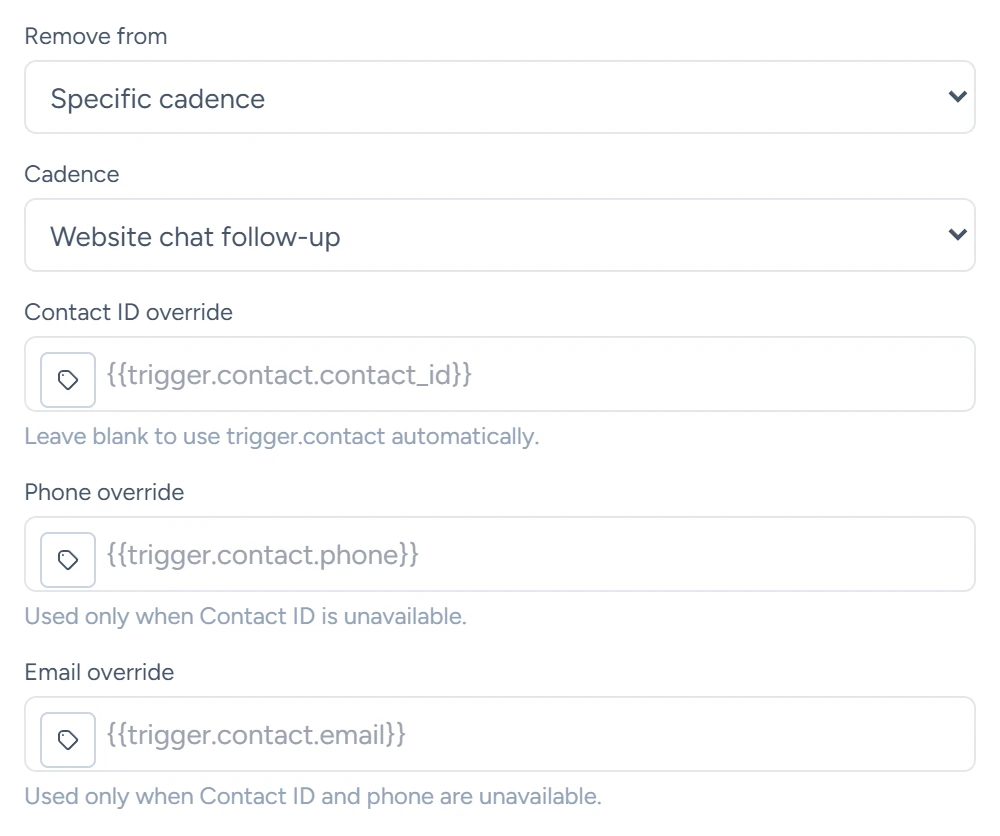
The Remove From Cadence step's fields, which runs it stops and how it finds the contact, plus Stop Current Workflow for ending a run.
What this does
Remove From Cadence stops the contact's other active runs, either in one workflow you pick or in every workflow of the account. A cadence is the app's word for a workflow here. The run that reaches this step carries on. A common use in Small Business Chatbot: when a booking comes in, stop the follow-up workflow that was still chasing that person.
- Where
- Workflows › a step's Node settings › Node type: Remove From Cadence
- Needs
- a contact on the run, from the trigger or an override field
Fields
| Field | What it does | Default or options |
|---|---|---|
| Remove from | Which workflows to stop runs in. | Specific cadence. Options: Specific cadence, All cadences |
| Cadence | With Specific cadence: the workflow whose runs stop. The list shows every workflow in the account, this one included. | Select a cadence |
| Contact ID override | The contact to stop runs for. | Empty. Blank uses the trigger's contact |
| Phone override | Used when there's no contact ID. | Empty |
| Email override | Used when there's no contact ID or phone. | Empty |
Which runs it stops
- Runs of the chosen workflow, or of all workflows, whose status is Queued, Running, Waiting, Retry wait or Paused.
- Runs whose contact matches by contact ID, email or phone. A run's contact comes from its trigger, or from a CRM step that ran in it.
- Other runs of this same workflow, when you pick it under Cadence. The run that reaches this step carries on.
Each stopped run gets the status Removed, with "Removed from cadence by workflow node" as its last error and a Removed From Cadence line in its timeline.
The contact can start the workflow again on its next trigger. To allow one run per contact, turn on Only enrol each contact once for that workflow.
What it saves
| Output | What it holds |
|---|---|
removed_execution_count |
How many runs it stopped |
removed_execution_ids |
Their IDs |
contact_id |
The contact it matched on |
summary |
A line such as "Removed 1 active cadence execution for contact ..." |
The step fails when it has no contact ID, phone or email to go on, when Specific cadence has no workflow chosen, or when the chosen workflow is missing from the account. A step that stops no runs still succeeds.
Stop Current Workflow
Stop Current Workflow ends the run that reaches it. It has no fields. The run's status becomes Removed and no later step runs. Use it at the end of a branch where nothing else should happen. A branch that has no step ends the run as Completed instead.
Guides that use it
- Steps
- Outbound switches and limits: stopping follow-ups when a contact replies or books.