
Executions
What the Executions view shows for each run, what each status means, how a failed step reads, and which values are masked.
What this does
Each time a trigger starts a workflow, Small Business Chatbot records a run, called an execution in the app. Executions lists a workflow's runs with their contact, status and current step. Each run opens to a timeline of its steps, and each step shows the data it received and saved.
- Where
- Workflows › pick a workflow › Executions, beside Editor at the top
- Shows
- the latest 150 runs of the workflow
The list
| Column | What it shows |
|---|---|
| Execution | The run's ID, with a Replay label on replays |
| Contact | The run's contact: first name, phone and email, when it has one |
| Status | The status, and the time from the run's start to its last change |
| Started | When the run started |
| Updated | When the run last changed |
| Current step | The step the run is on or stopped at |
| Start step | The trigger that started it |
| Actions | The buttons below |
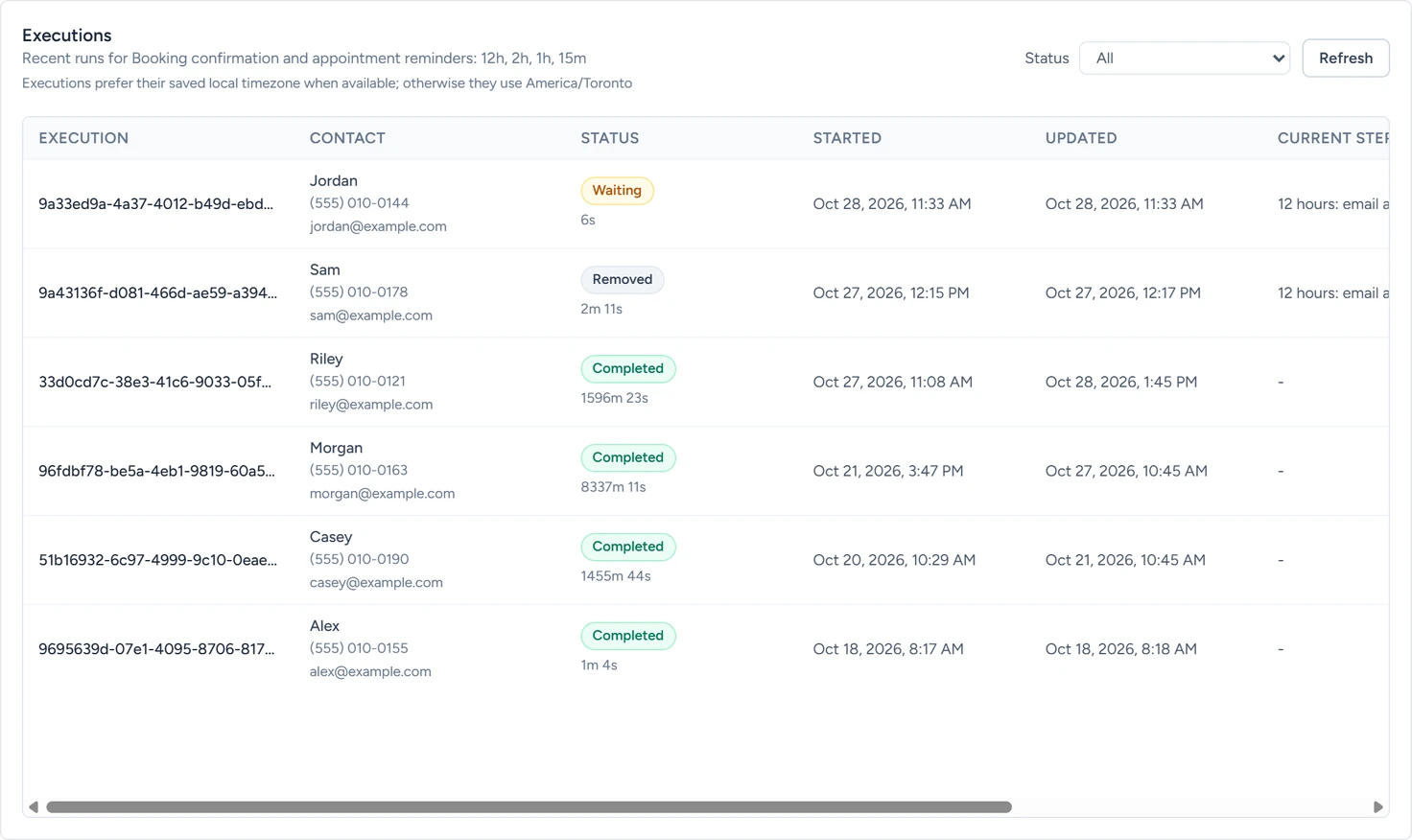
Status above the list filters it, and Refresh reloads it. Times show in the appointment's time zone for appointment runs, and in the Workflow timezone otherwise.
Statuses
| Status | What it means |
|---|---|
| Queued | The run is created and about to start. |
| Running | A step is running. |
| Waiting | The run is paused at a Wait or Relative Wait step, or waiting to try a failed step again. |
| Paused | The workflow was moved back to Draft. The run carries on when you publish it again. |
| Completed | The run reached the end of its branch. |
| Failed | A step failed and its retries ran out. Last error says why. |
| Cancelled | Someone stopped it with Remove from workflow. |
| Removed | A contact's reply, a Remove From Cadence step, a Stop Current Workflow step or a cancelled appointment stopped it. |
| Blocked due to re-enrol | Only enrol each contact once stopped it before its first step. |
The Status filter also lists Retry wait and Timed out. A run waiting to retry a step shows as Waiting. Removed and Cancelled runs show under All.
Actions
| Button | Shown on | What it does |
|---|---|---|
| Fast-forward current wait | Waiting runs | Ends the current wait now, so the next step runs. |
| Replay with current workflow | Every run | Starts a new run with the same trigger data, on the workflow as it is saved now. |
| Remove from workflow | Queued, running, waiting and paused runs | Stops the run. Its status becomes Cancelled. |
A replay runs every step again, so its texts, emails, calls and requests go out again. Replays need the workflow to be Published, run one at a time per workflow, and ignore Only enrol each contact once.
Execution details
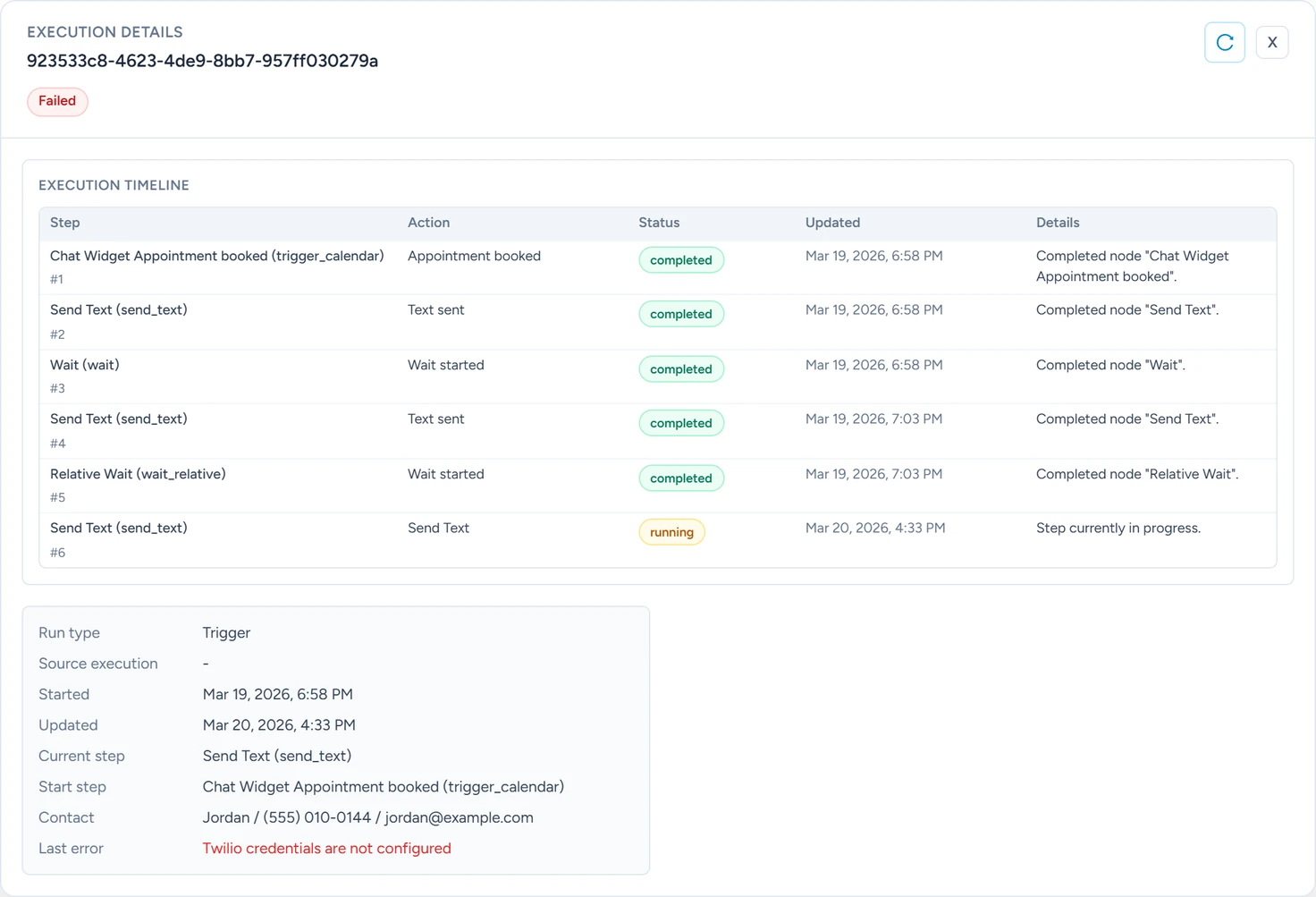
Click a run to open Execution details. It shows the run's ID, its status and the fast-forward and replay buttons, then:
- Execution timeline, one row per step in workflow order, with Step, Action, Status, Updated and Details. In a completed run, a step on the branch not taken reads "Step was not reached in this run."
- A summary: Run type (Trigger or Replay), Source execution for a replay, Started, Updated, Current step, Start step, Contact and Last error.
- Raw JSON, the run's full record.
A step's input and output
Open any step in the Editor to see what it did in a run. The Node settings window shows, on the left, the runtime data inspector: pick a run under Execution (the latest 30) and a step under Inspector node, then click Refresh data.
| Part | What it shows |
|---|---|
| Execution context | The run's status, current step, the step you're inspecting, when it last changed and its last error |
| Input | What the step received: the trigger data, variables and the previous step's output. Upstream nodes lists the steps before it. |
| Output | What the step saved. Recent node events lists its last eight events. |
Input and Output each switch between TABLE, JSON and SCHEMA views. Step outputs are listed on each step's page.
When an AI voice call is answered, its summary and transcript arrive by email after the call.
When a step fails
- The run waits a minute and tries the step again. A run gets 3 of these retries in all, across all its steps. Meanwhile its status is Waiting and Last error holds the error.
- If the step still fails, the run's status becomes Failed. Last error keeps the step's message.
To prevent a double send, a text, email or call that may already have gone out on an earlier try is skipped on the retry. That step fails with "Outbound action has an earlier indeterminate delivery attempt and was not resent."
Each step's Settings tab, in the Node settings window, changes what happens:
| Setting | What it does | Default |
|---|---|---|
| On error | Stop workflow fails the run as above. Continue workflow saves the error as the step's output and runs the next step. | Stop workflow |
| Always output data | Saves an output even when the step returns nothing. | Off |
| Enable node retry policy | Retries this step first, before the run's own 3 retries. | Off |
| Max retry attempts | How many times this step is retried. | 0 |
| Delay between retries (seconds) | The wait between this step's retries. | 60 |
With Continue workflow, the step's output is status error with the message in error.
Common errors
| Last error reads | Why | What to do |
|---|---|---|
| "Workflow outbound delivery is disabled for this workspace" | Outbound automation is off. | Turn it on under CRM › Contacts › Settings. |
| "Workflow outbound sms delivery is disabled" (or email, voice) | That channel is off. | Turn on the channel. |
| "CRM destination has opted out of workflow sms delivery" (or email, voice) | The person has opted out. | Nothing. The block is working. |
| "rolling 24-hour limit of" and a number "was reached" | The channel's daily limit is used up. | Wait, or raise the limit. |
| "Voice agent phone number is missing for this tenant" | The account has no business number. | Set one up under Voice Agent › Settings. |
| "HTTP request node received HTTP 401" or another 4xx or 5xx | The other site refused the request. | Check the credential and the address. |
| "Workflow HTTP Request blocked non-public destination" | The address points at a private network. | Use the tool's public address. |
| "Workflow credential" and "was not found" | The step's credential was deleted. | Pick another credential on the step. |
Limits and switches explains the switches, limits and opt-outs.
What is masked
- HTTP Request headers whose names look secret, such as Authorization or X-API-Key, show only their first two and last two characters. HTTP Request lists the names.
- Credential secrets are never part of a run. A request shows its credential's ID, name and type only.
- Everything else shows as it was sent or received: the text of texts and emails, AI answers, response headers and bodies, and the contact's name, phone and email.
Deleting a workflow
Delete workflow removes the workflow and its whole execution history. The app asks you to type DELETE first.