
CRM steps
The fields of the eight CRM steps, how each finds or creates its record, and what each saves.
What this does
The CRM steps read and change records in the CRM of Small Business Chatbot: Find Contact, Upsert Contact, Upsert Company, Upsert Opportunity, Create CRM Note, Create CRM Task, Add Contact Tag and Remove Contact Tag. Upsert means the step updates the matching record or creates one when none matches. The steps run whatever the Passive CRM sync switches say.
- Where
- Workflows › a step's Node settings › Node type: one of the eight steps
- Needs
- nothing
IDs come from the trigger or an earlier step, as variables, for example {{trigger.contact.contact_id}} or {{node_outputs_by_name.upsert_contact.contact_id}}.
Find Contact
Looks up one contact. When none matches, the step still succeeds, with found set to false.
| Field | What it does | Default or options |
|---|---|---|
| Contact field | Which field Lookup value is matched against. | Phone. Options: Phone, Email, Contact ID |
| Lookup value | The value to look for. When it is filled, the three fields below are ignored. | Empty |
| Contact ID | Looks up by ID. | Empty |
| Phone | Looks up by phone. | Empty |
| Looks up by email. | Empty |
Saves found (true or false), contact_id, contact (the contact's fields) and match_type (contact_id, phone, email or none).
Upsert Contact
Updates the contact that matches the Contact ID, Phone or Email, or creates a contact when none matches.
| Field | What it does | Default or options |
|---|---|---|
| Contact ID | Matches this contact first. | Empty |
| First name, Last name, Full name | The contact's name. | Empty |
| Email, Phone | Used to match and saved on the contact. | Empty |
| Website, LinkedIn URL, Business name | Saved on the contact. | Empty |
| Status | Saved as typed. | Empty |
| Source | Saved as the contact's source. On an existing contact it replaces the current source. | workflow |
| Tags | Tags to add, separated by commas. Saved in lowercase. | Empty |
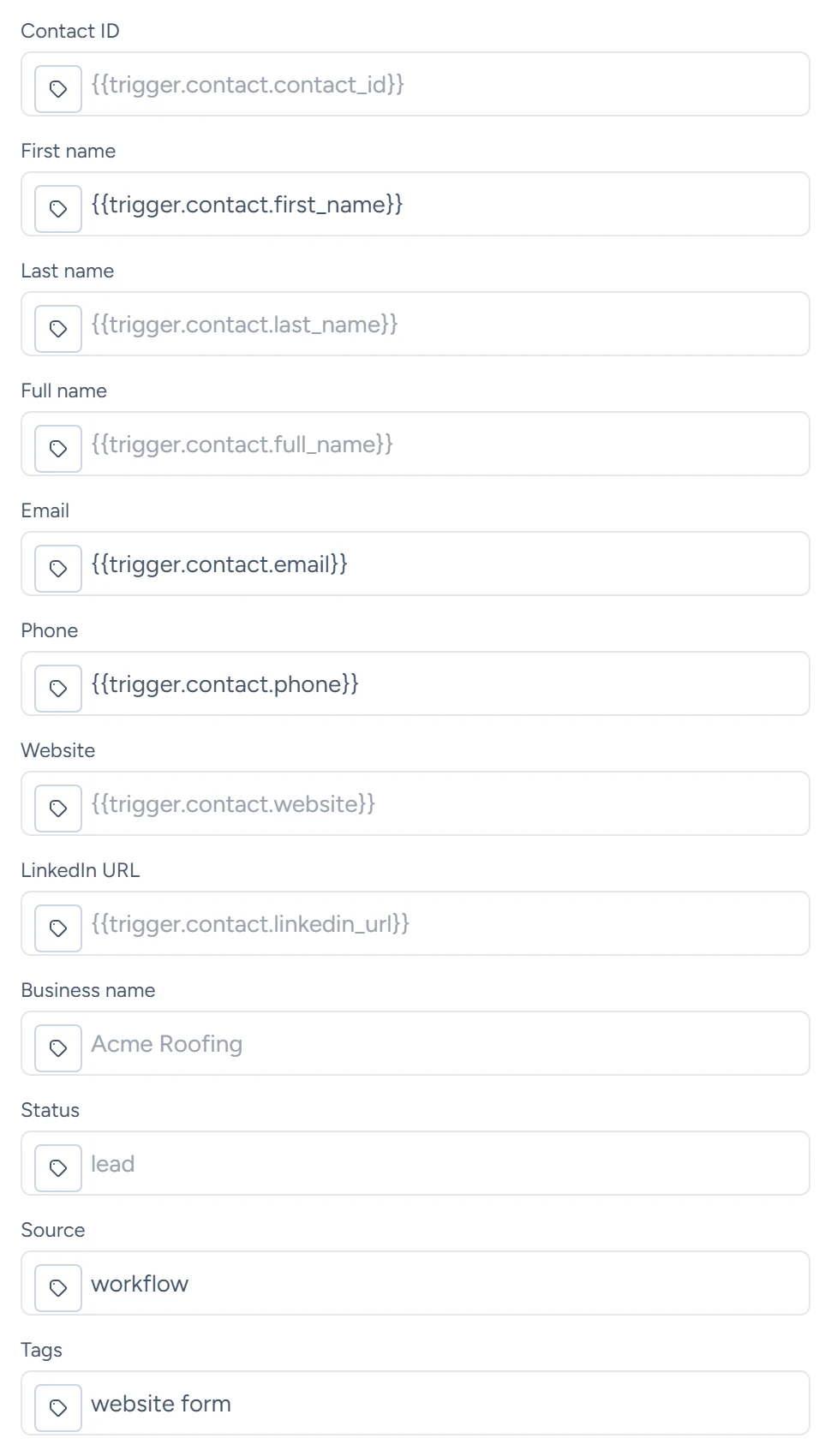
A blank field keeps the contact's current value. Tags are added to the contact's existing tags; to remove one, use Remove Contact Tag. Saves contact, contact_id, created (true for a new contact) and matched_by.
Upsert Company
| Field | What it does | Default or options |
|---|---|---|
| Company ID | Updates this company. | Empty |
| Company name | Required. With no ID, a company with the same name is updated, otherwise a new one is created. | Empty |
| Website, Company email, Company phone, Industry | Saved on the company. | Empty |
Saves company_id, record and created.
Upsert Opportunity
| Field | What it does | Default or options |
|---|---|---|
| Opportunity ID | Updates this opportunity. | Empty |
| Opportunity name | Required. | Empty |
| Primary contact ID | Required. The contact must exist. | Empty |
| Primary company ID | The company must exist when filled. | Empty |
| Pipeline ID, Stage ID | Required. The stage must be an active stage of that pipeline. | Empty |
| Status | The opportunity's status. | Open. Options: Open, Won, Lost, Abandoned |
| Monetary value | Saved as a whole number. | 0 |
Saves opportunity_id, record and created.
Create CRM Note
| Field | What it does | Default or options |
|---|---|---|
| Note | Required. The note's text. | Empty |
| Contact ID, Company ID, Opportunity ID | The records the note is on. Each must exist when filled. | Empty |
Saves note_id and record.
Create CRM Task
| Field | What it does | Default or options |
|---|---|---|
| Task title | Required. | Empty |
| Description | The task's details. | Empty |
| Contact ID, Company ID, Opportunity ID | The records the task is on. Each must exist when filled. | Empty |
| Due at | The due date and time, such as 2026-08-10T14:00:00Z. A time with no time zone is read as UTC. |
Empty |
| Priority | The task's priority. | Normal. Options: Low, Normal, High, Urgent |
New tasks are open. Saves task_id and record.
Add Contact Tag and Remove Contact Tag
| Field | What it does | Default or options |
|---|---|---|
| Contact ID, Phone, Email | Find the contact to change. | Empty |
| Tag | Required. The tag to add or remove, saved in lowercase. | Empty |
The contact must exist. Saves contact, contact_id, tag and tags, the contact's tags after the change.
When a CRM step fails
| You see in Last error | Why |
|---|---|
| "requires review because an identifier matches multiple contacts" | The phone or email belongs to more than one contact. Merge them under CRM › Contacts or use Contact ID. |
| "requires review because the supplied identifiers match different contacts" | The ID, phone and email point at different contacts. |
| "could not find a CRM contact to update" | Add Contact Tag or Remove Contact Tag found no contact. |
| "node requires:" and a field name | A required field is empty. |
| "was not found" | An ID points at a contact, company or opportunity that doesn't exist. |
After a CRM step runs
After Find Contact, Upsert Contact, Add Contact Tag or Remove Contact Tag, the run knows its contact. Executions shows it, and replies and Remove From Cadence match the run by it.
Records and tags these steps create start no other workflows. The one exception: with Automatically create and link companies on, a company that Upsert Contact creates from Business name fires Company created.
Guides that use it
- Contacts
- Companies and opportunities
- Inbound webhooks: a webhook run often starts with Upsert Contact.