
Send Text
The Send Text step's fields, the checks it runs before a text goes out, and what it saves.
What this does
When a run reaches Send Text, Small Business Chatbot sends one text from your business phone number to the number in Recipient phone. The text is logged on the matching CRM contact's timeline as SMS sent.
- Where
- Workflows › a step's Node settings › Node type: Send Text
- Needs
- Outbound automation and Text messages on, and a business phone number
- Counts toward
- the daily limit for texts
Fields
| Field | What it does | Default or options |
|---|---|---|
| Recipient phone | The number to text. Type it, or insert a variable such as {{trigger.phone}}. A 10-digit number without + is read as a North American number and gets +1. |
Empty. In a workflow that starts with an appointment trigger: {{trigger.contact.phone}} |
| Message | The text to send. Variables are filled in when the step runs. | Empty |
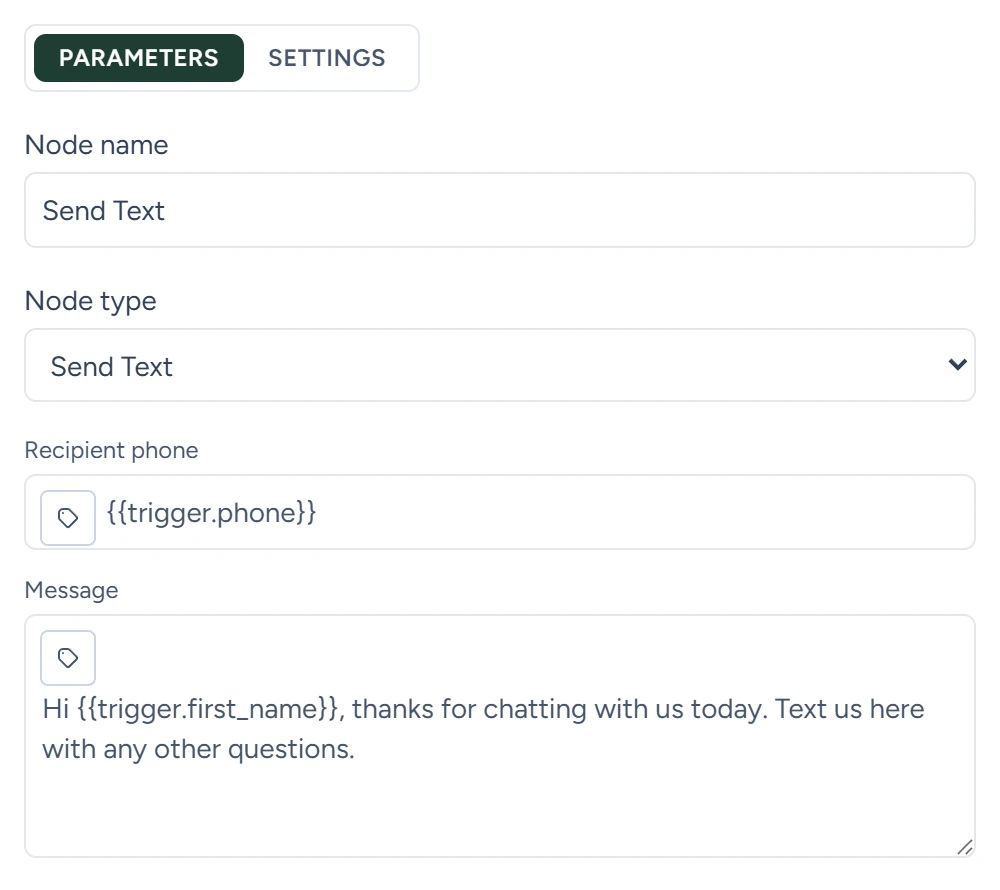
Both fields are required. An empty one fails the step when it runs. Fill-in rules for {{...}} are on Variables.
Before it sends
The step runs these checks in this order. The first one that fails stops the step, and nothing is sent.
| Check | When it fails |
|---|---|
| Your business phone number | No number is set up for the account. The step fails with Voice agent phone number is missing for this tenant. |
| Outbound automation and Text messages | Either switch is off under CRM › Contacts › Settings. |
| Opt-outs | Any CRM contact with this number has Do not text or Do not contact (all channels) checked, or the number has opted out by texting STOP. |
| Daily limit for texts | The texts sent or started by all your workflows in the last 24 hours have reached your limit. |
The switches, limits and opt-outs are on Limits and switches.
A published workflow with texts switched on texts real people. Test with your own number in Recipient phone first.
What it saves
Later steps read these with the step's Node name, for example {{node_outputs_by_name.send_text.to}} for a step named Send Text.
| Output | What it holds |
|---|---|
status |
success |
to |
The number texted, with its country code |
from |
Your business number |
message_text |
The text as sent, with variables filled in |
message_sid |
The text's ID at Twilio, which sends it |
crm_activity_id |
The ID of the SMS sent entry on the contact's timeline |
summary |
A line such as "SMS sent to +15555550100." |
After it sends
- The run moves to the next step straight away. A reply stops the run when Stop workflows when contact replies is on for the workflow, with Text replies checked.
- If a retry finds that an earlier attempt may already have reached the carrier, the step fails instead of sending again, so the person gets the text once.