
Limits and switches
The outbound switches, daily limits, opt-outs, stop on reply and each workflow's settings, with their defaults and the limits on runs and steps.
What this does
Small Business Chatbot sends nothing from a workflow until you allow it. Texts, emails and AI calls go out only from a Published workflow, with Outbound automation and that channel switched on, under the daily limit, and to a contact who hasn't opted out. This page lists every switch and limit with its default.
- Outbound switches
- CRM › Contacts › Settings › Outbound automation
- Workflow settings
- Workflows, the left column of the editor
- Opt-outs
- a contact's Communication preferences in CRM › Contacts
Outbound automation
Under CRM › Contacts, the Settings tab. Changes take effect when you click Save settings.
| Switch | What it does | Default |
|---|---|---|
| Outbound automation | The master switch. While it is off, no workflow sends a text, email or call. Turning it on turns on all three channels. | Off |
| Text messages | Allows Send Text steps. | Off |
| Emails | Allows Send Email steps. | Off |
| Voice calls | Allows AI voice call steps. | Off |
| Daily limit | One per channel: the most that channel may send in any 24 hours. Shown under each channel and editable while it is on. | 100 texts, 250 emails and 25 calls per day. From 1 to 10,000 |
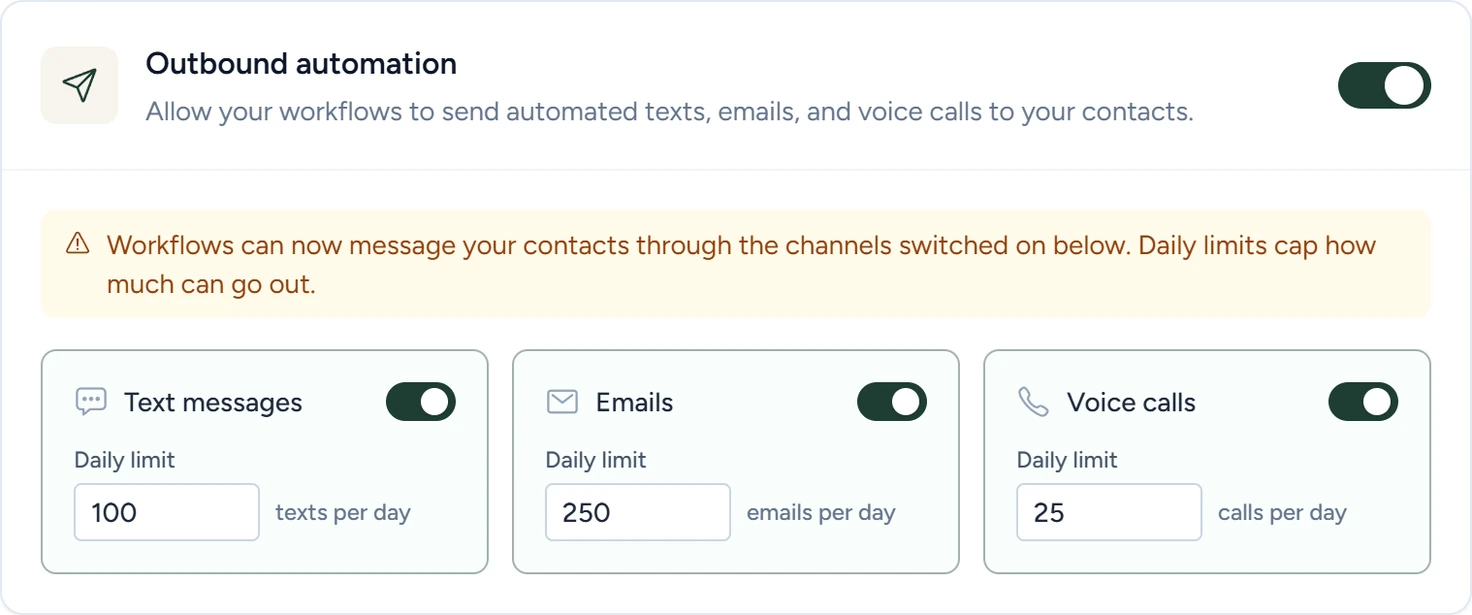
Turning on one channel while the master switch is off turns the master switch back on. The checks happen when each step runs, so switching a channel off stops sends already waiting in runs.
The switches hold Send Text, Send Email and AI voice call only. HTTP Request, AI Agent and the CRM steps run whatever they say. To stop those, switch the workflow back to Draft.
Daily limits
- Each limit counts that channel's sends started or completed by all your workflows in the last 24 hours, rolling, not since midnight.
- A send past the limit is blocked. The step fails with "Workflow outbound" and the channel, then "rolling 24-hour limit of" and the number "was reached".
- A failed step is tried again by the workflow's retries. A blocked send can go out on a later try once the count is under the limit.
- Only workflow sends count. The AI receptionist's replies in a conversation, such as its replies to texts, are outside these limits.
Opt-outs
Every text, email and call a workflow sends checks the person's opt-outs first. A contact's Communication preferences in CRM › Contacts has four boxes:
| Box | Blocks |
|---|---|
| Do not contact (all channels) | Workflow texts, emails and calls |
| Do not text | Workflow texts |
| Do not email | Workflow emails |
| Do not call | Workflow AI calls |
- The check uses the number or address being sent to. If any contact with that number or address has a matching box checked, nothing is sent.
- Send Email checks the To, CC and BCC addresses one by one.
- A text whose whole message is STOP, STOPALL, STOP ALL, UNSUBSCRIBE, CANCEL, END or QUIT sets Do not text. START, UNSTOP, YES or RESUBSCRIBE clears it. Opt-outs and STOP shows where to see them.
- A blocked send fails its step.
Workflow settings
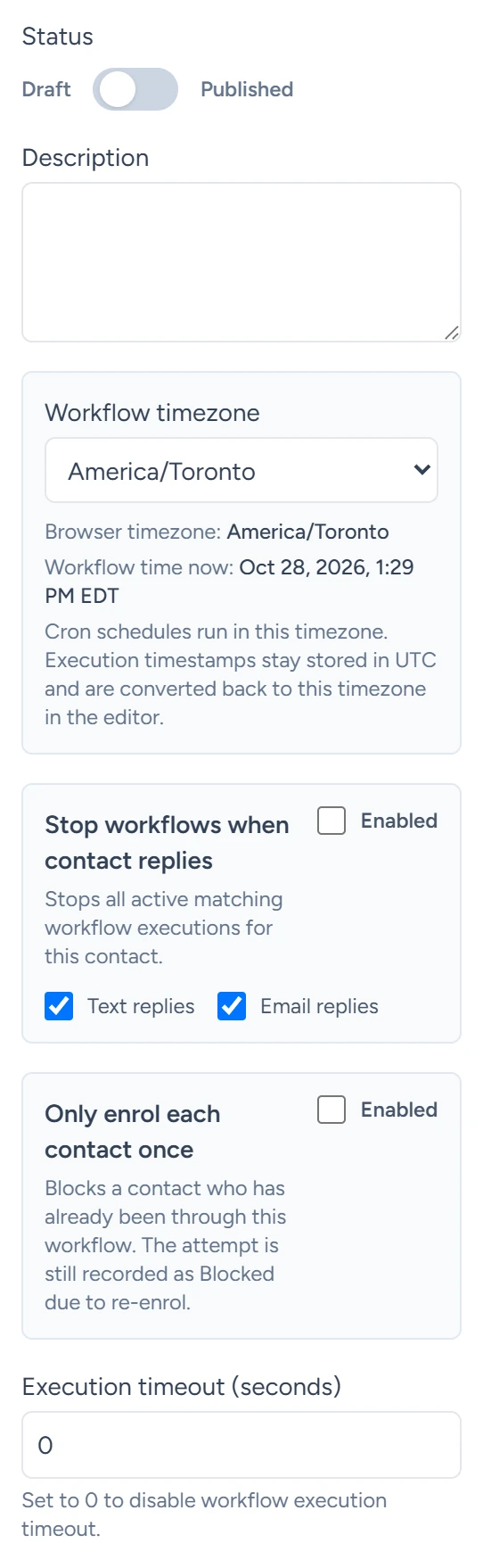
In Workflows, the left column of the editor. They take effect when you click Save workflow.
| Setting | What it does | Default |
|---|---|---|
| Status | Only Published workflows start runs. Moving a workflow back to Draft pauses its active runs, and their waits stop counting down. Publishing again resumes them. | Draft |
| Workflow timezone | The time zone for Cron schedules and for a Wait's allowed days and hours. Use browser timezone sets your browser's. | Your browser's time zone when the workflow was created |
| Stop workflows when contact replies | When Enabled, a text or email reply from a contact stops that contact's active runs of this workflow. Their status becomes Removed. | Off |
| Text replies, Email replies | Which replies count when stopping is enabled. | Both checked |
| Only enrol each contact once | When Enabled, a contact goes through this workflow only once. A later attempt shows as Blocked due to re-enrol. | Off |
| Execution timeout (seconds) | The longest a run may last from its start, waits included. 0 means no limit. | 0 |
Stop on reply
- Only text and email replies stop runs.
- A text reply matches a run by the contact's phone. An email reply matches by the contact's email, or by the email thread the run sent.
- A run knows its contact from the trigger's
contactfields, or from a Find Contact, Upsert Contact, Add Contact Tag or Remove Contact Tag step that ran in it. - The stopped run's last error reads "Stopped because contact replied".
Only enrol each contact once
- A contact is recognised by contact ID first, then email, then phone.
- When this is on, a run whose trigger carries no contact is blocked too. Cron runs skip this check.
- Replay with current workflow in Executions always runs, whatever this setting says.
Limits on runs
| Limit | Value |
|---|---|
| Active runs per workflow | 100 at once (Queued, Running, Waiting and Paused). While 100 are active, a new trigger is skipped. Cron runs are exempt. The same for every workflow. |
| Retries of failed steps | 3 per run in all, a minute apart, before the run is marked Failed. Each step's Settings tab adds its own retry policy. |
| Replays | One replay at a time per workflow. |
| Runs listed in Executions | The latest 150. |
Limits on steps
| Step | Limit |
|---|---|
| HTTP Request | 30-second timeout by default. Up to 10 redirects. The first 15,000 characters of the response body are kept as text. |
| AI Agent | Up to 12 tool iterations. System and user messages are cut at 4,000 characters each. The final answer is cut at 8,000. |
| AI voice call | One call at a time to each number. |
| Inbound Webhook | The last 20 requests are kept as samples. |
| Send Email | One email per step. |