
Wait and Relative Wait
The Wait and Relative Wait steps' fields, how allowed days and hours move a wait, and what happens when a relative time has already passed.
What this does
Wait pauses a run for a set time. Relative Wait pauses it until a set time before or after a date in the run, such as an appointment's start. While a run waits, its status in Executions is Waiting, and the step's wait_until output holds when the wait ends. In Small Business Chatbot, both steps only pause the run.
- Where
- Workflows › a step's Node settings › Node type: Wait or Relative Wait
- Needs
- nothing
Wait
| Field | What it does | Default or options |
|---|---|---|
| Wait time | How long to pause, as a number and a unit. | 5 minutes. Units: Minutes, Hours, Days |
| Allowed days and hours | Under Advanced settings. With Restrict to allowed days/hours checked, a wait that would end outside the window ends at the next allowed time instead. | Off |
| Allowed days | The days a wait may end on. Shown when the restriction is on. | Monday to Friday |
| Start time | The start of the allowed hours, in the workflow's time zone. | 09:00 |
| End time | The end of the allowed hours. It must be later than Start time for the window to apply. | 17:00 |
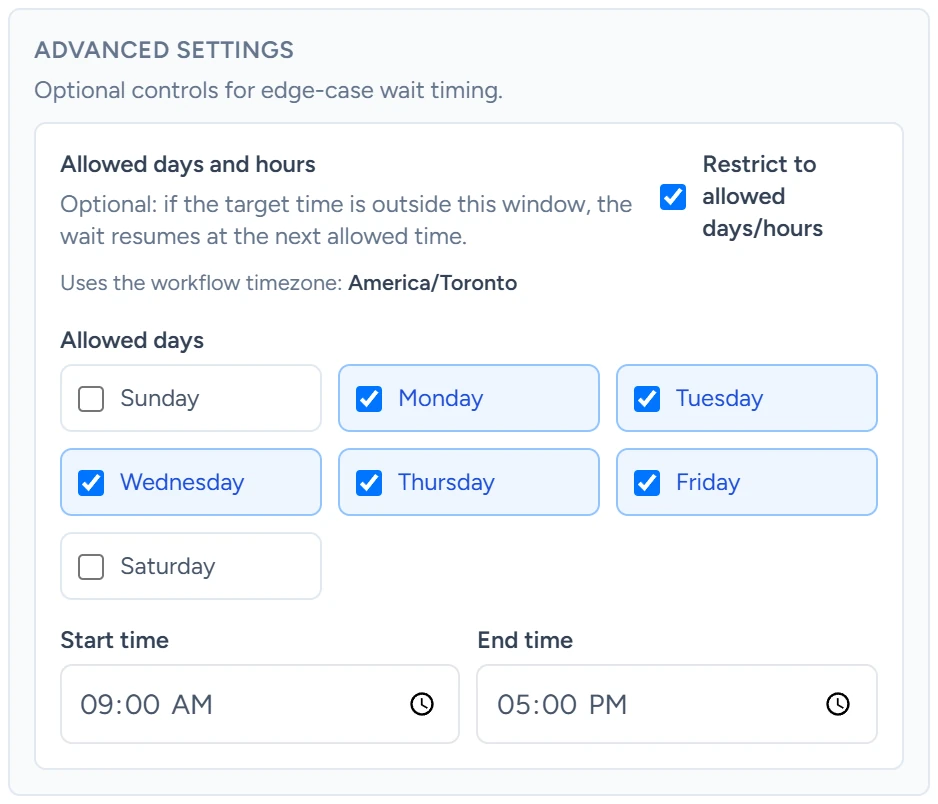
How allowed days and hours move a wait
The step works out the end of the wait first, then checks it against the window in the workflow's time zone (Workflow timezone in the workflow's left column).
| The wait would end | It ends at |
|---|---|
| On an allowed day, before Start time | Start time that day |
| On an allowed day, between Start time and End time | The time it would end anyway |
| After End time, or on a day outside Allowed days | Start time on the next allowed day |
For example, a 2-hour wait that starts at 4:30 PM on a Friday, with the defaults, ends at 9:00 AM on Monday.
Relative Wait
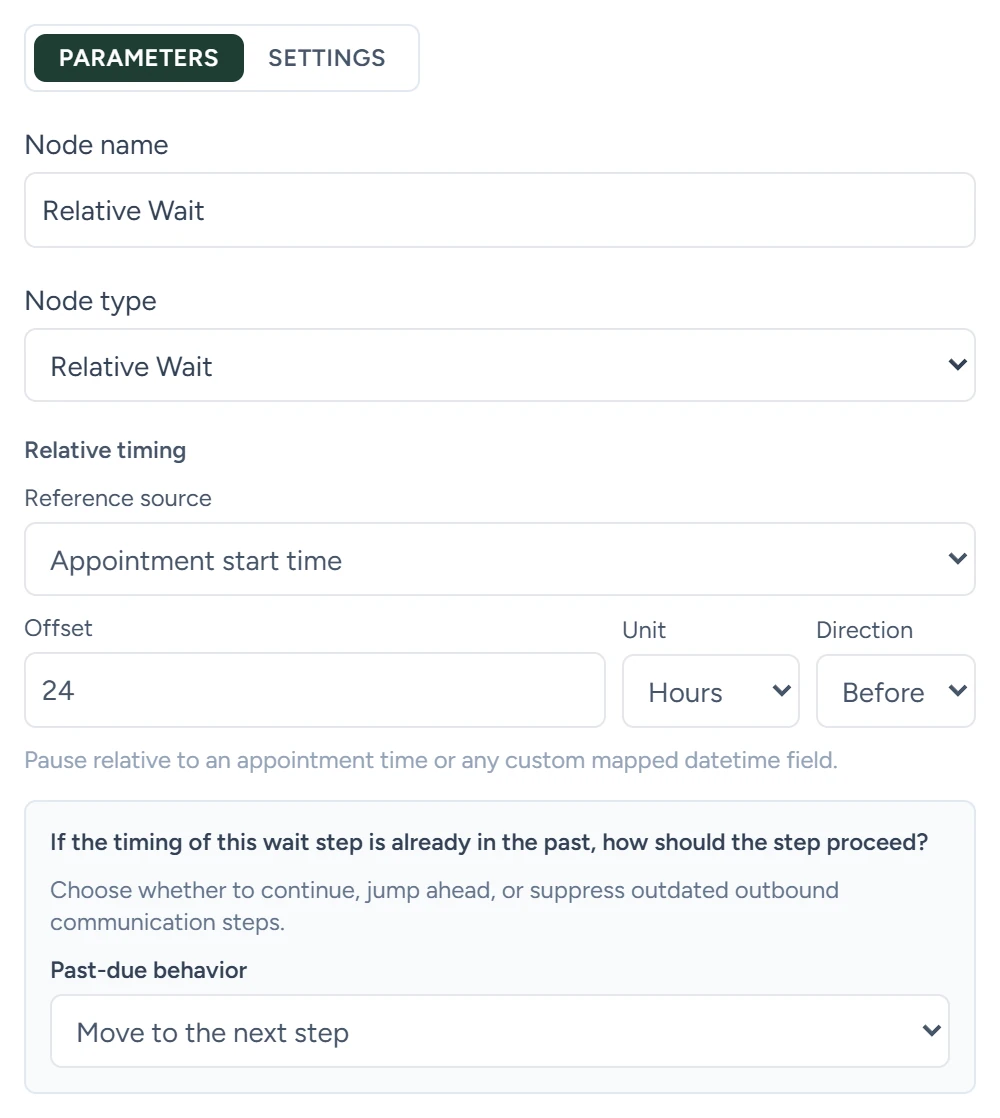
The fields sit under Relative timing, then under If the timing of this wait step is already in the past, how should the step proceed?
| Field | What it does | Default or options |
|---|---|---|
| Reference source | The date the wait counts from. | Appointment start time. Options: Appointment start time, Appointment end time, Custom field |
| Custom datetime field | With Custom field: the path to a date in the run's data, such as trigger.event.reference_at_iso. |
Empty |
| Offset | How far from the date. | 1 |
| Unit | The offset's unit. | Hours. Options: Minutes, Hours, Days |
| Direction | Before or after the date. | Before. Options: Before, After |
| Past-due behavior | What the step does when the time it works out has already passed. | Move to the next step. Options: Move to the next step, Move to a specific step, Skip all outbound communications until the next wait or selected reference date |
| Specific step | With Move to a specific step: the step the run jumps to. | Empty |
Allowed days and hours apply to Wait only.
The date it reads
The date can be an ISO date such as 2026-08-26T18:00:00Z, another written date, or a Unix time in seconds or milliseconds. A date with no time zone is read as UTC. If the field is empty or holds something other than a date, the run moves to the next step at once.
When the time has already passed
| Past-due behavior | What happens |
|---|---|
| Move to the next step | The run carries on with the next step at once. |
| Move to a specific step | The run jumps to Specific step and skips the steps in between. |
| Skip all outbound communications until the next wait or selected reference date | The run carries on, but Send Text, Send Email, AI voice call and HTTP Request steps are marked skipped instead of running. Sending starts again at the next Wait or Relative Wait step, or once the reference date passes. |
For example, a reminder 24 hours before an appointment booked only 3 hours ahead is already past due when the run reaches it.
Rescheduled and cancelled appointments
When an appointment is rescheduled, the runs that Appointment booked started for it get the new times, and a Relative Wait counting from the appointment is worked out again. When an appointment is cancelled, those runs stop with the status Removed.
What it saves
| Output | What it holds |
|---|---|
wait_until |
When the wait ends, in UTC |
requested_wait_until |
Wait only, when the window moved it: the time it would have ended |
clamped_to_window |
Wait only: true when the window moved it |
status |
Relative Wait only, when past due: past_due |
past_due_behavior |
Relative Wait only, when past due: the choice that was applied |
While a run waits
- A reply from the contact stops a waiting run when Stop workflows when contact replies is on for the workflow.
- Moving a workflow back to Draft pauses its waiting runs. Their countdown stops and carries on when you publish it again.
- To end a wait early while you test, use Fast-forward current wait in Executions.
Guides that use it
- Your first workflow
- Calendar booking: the reminder workflow the calendar settings create waits until 24 hours before, 1 hour before and 1 day after each appointment.
- Outbound switches and limits