
Contact created and tag added
Start a workflow when a chat, text or booking creates a CRM contact, when you add one, or when you tag one, with every field of that contact.
What this does
Small Business Chatbot has two contact triggers. Each starts a run in every published workflow that uses it.
- Labels in the app
- Contact created, Contact tag added
- Fires
- When a chat, text or booking creates a CRM contact, when you add a contact, or when you add a tag to a contact in the app
- Carries
- The contact, as
{{trigger.contact.…}}, plus the tag on Contact tag added - Settings
- Tag to watch on Contact tag added. Contact created has none.
When they fire
Contact created fires once for each new contact:
- When a website chat, a text conversation or a booking creates a contact. That needs Passive CRM sync and Save contacts on for that channel under CRM › Contacts › Settings. A chat also needs a phone number or email from the visitor.
- When you click New contact in CRM › Contacts and save it.
Contacts saved from answered calls and email replies, and contacts under Needs review, don't fire it. For callers, start the workflow with Call ended. A new contact whose phone or email matches an existing contact updates that contact instead.
Contact tag added fires once for each tag added to an existing contact:
- When you edit a contact's tags in CRM › Contacts and save.
- When you select contacts and click Add tag. Each selected contact starts its own run. This is how to start a workflow for contacts you pick, imported ones included.
Contacts and tags from a CSV import, and changes a workflow step makes, fire neither trigger. To tag a new contact and start a Contact tag added workflow, save the contact first, then add the tag.
Tag to watch
On Contact tag added only. Type the tag the workflow waits for, such as booked. Capitals and spaces at either end are ignored. "Leave blank to start on any newly added contact tag."
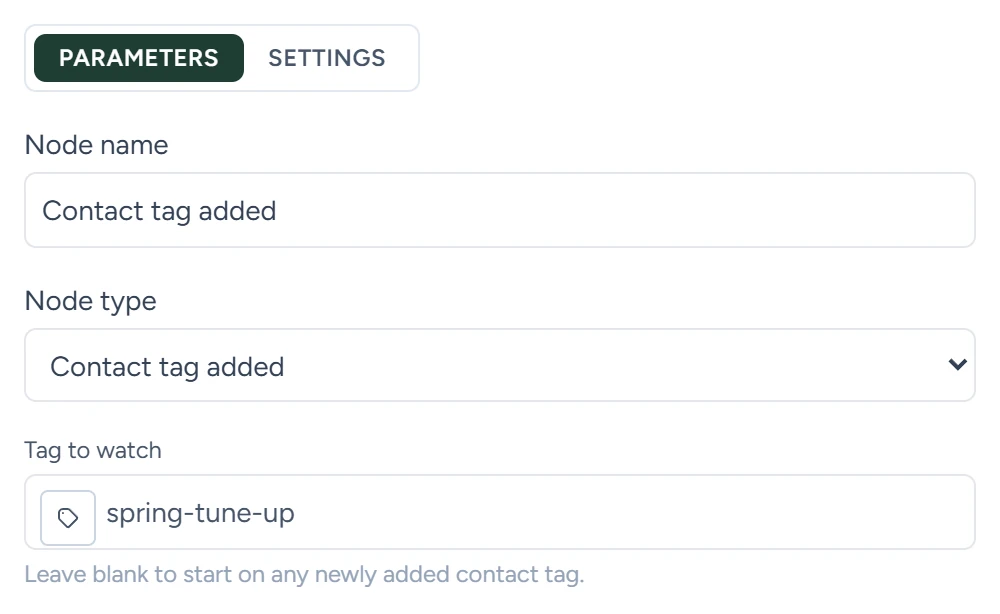
With Tag to watch blank, every tag you add starts the workflow, and adding two tags at once starts it twice.
What they carry
| Variable | Type | What it holds |
|---|---|---|
trigger.tag |
text | The tag that was added. Contact tag added only. |
trigger.event_name |
text | contact_created or contact_tag_added. Also in trigger.event_type and trigger.event.name. |
trigger.event_source |
text | Where the change came from, such as crm_contact_add_tag or chat_widget_passive_sync. Also in trigger.event.source. |
trigger.event.occurred_at_iso |
date and time | When it happened, in UTC |
trigger.public_config_id |
id | Your account's id. Also in trigger.workspace.public_config_id. |
trigger.contact.* |
object | The contact, with the fields below |
Contact fields
Every trigger that carries a contact uses these names. A field is empty when the contact has no value for it.
| Variable | Type | What it holds |
|---|---|---|
trigger.contact.contact_id |
id | The contact's id in your CRM |
trigger.contact.first_name |
text | First name |
trigger.contact.last_name |
text | Last name |
trigger.contact.full_name |
text | Full name |
trigger.contact.email |
text | |
trigger.contact.phone |
text | Phone number |
trigger.contact.website |
text | Website |
trigger.contact.linkedin_url |
text | LinkedIn address |
trigger.contact.business_name |
text | The contact's business |
trigger.contact.status |
text | The status's stored value, such as open or booked |
trigger.contact.tags |
list | All the contact's tags |
trigger.contact.custom_fields.* |
object | Your custom fields, by name |
trigger.contact.source |
text | Where the contact first came from |
trigger.contact.created_at, updated_at, last_activity_at |
date and time | When the contact was created, last changed and last active |
Example
A Contact tag added run:
{
  "event_name": "contact_tag_added",
  "event_source": "crm_contact_add_tag",
  "tag": "spring-tune-up",
  "contact": {
    "contact_id": "c_3317",
    "first_name": "Lee",
    "phone": "+14165550177",
    "email": "[email protected]",
    "tags": ["past-customer", "spring-tune-up"]
  }
}