
HTTP Request
The HTTP Request step's fields, how variables fill a JSON body, where a request may go, what it adds, and what it saves from the response.
What this does
When a run reaches HTTP Request, Small Business Chatbot sends one request to the address in Request URL and saves the response for later steps. It connects a workflow to any tool with a public API. To connect a particular tool step by step, use the HTTP request integration guide. This page is the field reference.
- Where
- Workflows › a step's Node settings › Node type: HTTP Request
- Needs
- a public
http://orhttps://address, and a workflow credential when the API needs a key - Not held by
- the outbound switches, daily limits or opt-outs
A published workflow sends its requests whatever Outbound automation, the daily limits and opt-outs say. A Relative Wait set to skip outbound communications skips this step too.
Fields
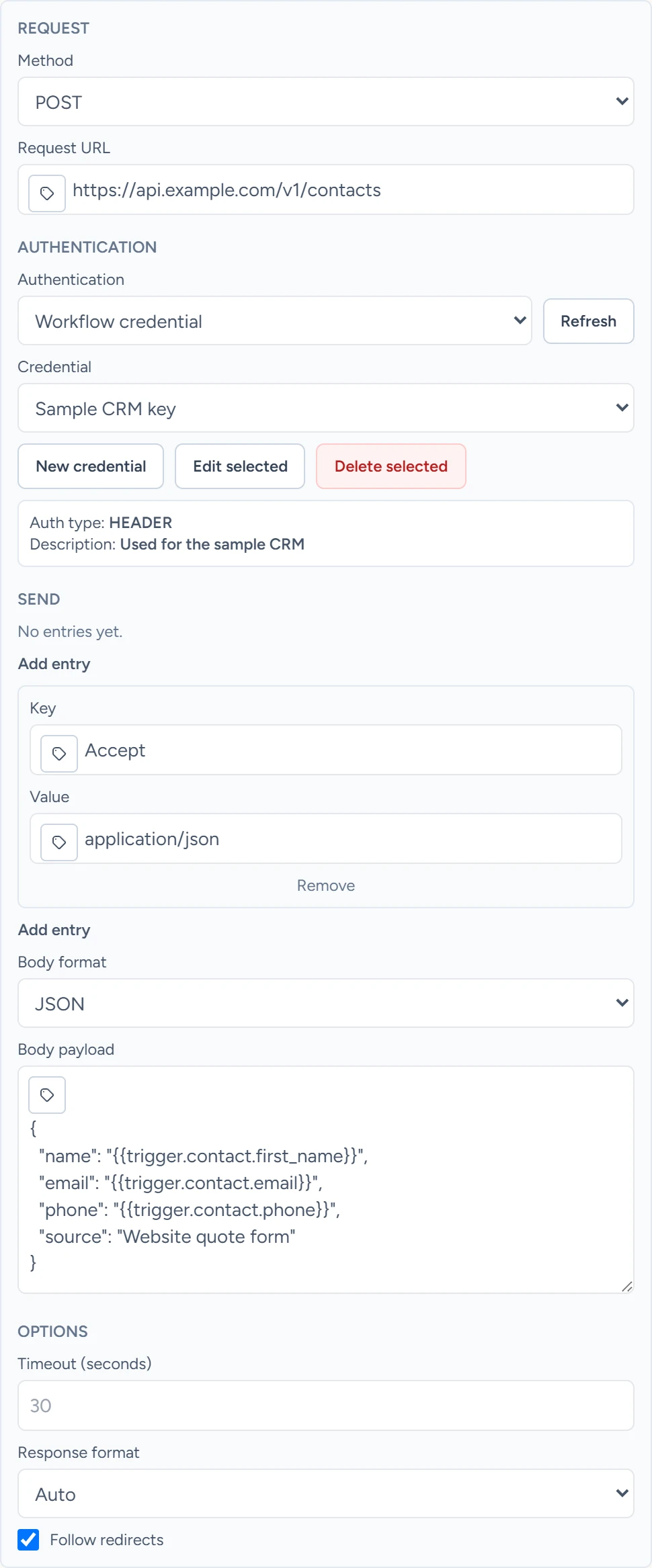
The editor has four parts: Request, Authentication, Send and Options.
| Field | What it does | Default or options |
|---|---|---|
| Method | The request's method. | GET. Options: GET, POST, PUT, PATCH, DELETE |
| Request URL | The address to call. Variables are allowed. Values typed into the address are sent as typed, so put values in Query parameters. | Empty. A blank address skips the step. |
| Authentication | Workflow credential sends a saved credential with the request. Refresh reloads the list. | None. Options: None, Workflow credential |
| Credential | With Workflow credential: which one. New credential, Edit selected and Delete selected manage them. | Select credential |
| Query parameters | Key and value pairs added to the address, URL-encoded. Add entry adds a pair. A key already in the address is replaced. | No entries |
| Headers | Key and value pairs sent as headers. | No entries |
| Body format | How the body is sent. | JSON. Options: JSON, Raw text, Form fields, No body |
| Body payload | With JSON or Raw text: the body. With Form fields this becomes Body form values, a list of key and value pairs. | Empty |
| Timeout (seconds) | How long to wait for an answer. | 30. Blank or 0 also means 30. |
| Response format | How the response body is read. Auto reads JSON when the response says it is JSON, and text otherwise. JSON gives an empty body for a response in any other format. | Auto. Options: Auto, JSON, Text |
| Follow redirects | Follows redirects (301, 302, 303, 307 and 308), up to 10. | On |
JSON sends Content-Type: application/json and Form fields sends application/x-www-form-urlencoded, unless Headers sets a Content-Type. With Raw text, set the Content-Type under Headers.
Variables in the request
Every field takes variables such as {{trigger.email}}. In the address, query parameters, headers, form values and raw text, a variable becomes text. The rules for each root are on Variables.
A JSON body follows these rules:
| How you write it | What is sent |
|---|---|
"{{trigger.email}}", a token alone inside quotes |
The value with its own type: text stays text, a number stays a number, an object stays an object |
"Chat with {{trigger.first_name}}", a token inside longer text |
Text |
{{trigger.contact}}, a token with no quotes |
The value written as JSON |
| A token whose value is missing | An empty string, "" |
{
  "email": "{{trigger.email}}",
  "name": "{{trigger.first_name}}",
  "note": "Website chat with {{trigger.first_name}}",
  "contact": "{{trigger.contact}}"
}
Quote every token, as above. The body is then valid JSON as you type it, and each value keeps its type.
If a body has even one token with no quotes, every token in it is written as JSON. A token inside longer quoted text then breaks the body, and the step fails with "the body payload is not valid JSON after workflow variables were resolved".
What it adds to the request
- An
Idempotency-Keyheader, unless Headers already has one. A retry of the same step in the same run sends the same key, so an API that honours the header ignores the repeat. A replay is a new run and sends a new key. - The credential's header when Authentication is Workflow credential: a Bearer token, a header you name, or Basic with a user name and password. For a Bearer or Header credential, if Headers already has a header with the same name, the one in Headers is sent instead. A Basic credential always replaces an
Authorizationheader from Headers. Workflow credentials lists what each type sends.
Where a request may go
| Rule | What happens |
|---|---|
http:// and https:// only |
Any other scheme fails the step. |
| Public addresses only | Localhost and private, link-local, reserved and multicast addresses are refused, on the first request and on every redirect. |
| No user name or password in the address | An address such as https://user:pass@host fails the step. Use a credential. |
| Redirect to another site | A different scheme, host or port drops the Authorization, Cookie and Proxy-Authorization headers and Basic credentials before the next request. |
| 302 and 303 redirects, and a 301 after a POST | The next request is a GET with no body. |
| More than 10 redirects | The step fails. |
A Header credential that uses another header name, such as X-API-Key, is still sent after a redirect to another site. Turn off Follow redirects when you use one with an API that redirects.
The response
A response with status 400 or higher fails the step, which is then retried like any failed step: see Executions. Last error reads "HTTP request node received HTTP" with the status, the method and the address, then a preview of up to 1,000 characters of the response.
Otherwise the step saves:
| Output | What it holds |
|---|---|
status |
success |
request.method, request.url |
What was sent, with the query parameters in the address |
request.headers |
The headers sent, with secret values masked |
request.credential |
The credential's ID, name and type, never its secret |
response.status_code |
The status, such as 200 |
response.headers |
The response's headers, as received |
response.body_text |
The first 15,000 characters of the body |
response.body |
The body read as JSON, or as text, by Response format |
Later steps read these with the step's Node name, for example {{node_outputs_by_name.http_request.response.body.id}} for a step named HTTP Request.
Header values are masked when the header's name is Authorization, Proxy-Authorization, X-API-Key, API-Key, APIKey or X-Auth-Token, or contains token, secret, password, key or authorization. A masked value keeps its first two and last two characters, such as Be***9f. A value of 4 characters or fewer shows as ***. The Idempotency-Key header is masked too, because its name contains key.
Guides that use it
- HTTP request
- Inbound webhooks
- AI Agent: its Workflow HTTP Request tool follows the same rules.