WordPress chatbot plugins: the three kinds, what each costs, and how to add one
Ten plugins sorted by who pays for the AI and who replies, with each price read on the company’s own page on Nov 23, 2026.

A WordPress chatbot plugin does one of three things. It connects your site to a hosted chatbot that the company runs for a monthly fee, it opens a live chat box your staff answer, or it runs an AI on your own key from an AI company such as OpenAI.
Bringing your own AI key means you open an account with an AI company, usually OpenAI, and paste its API key (a code that links the plugin to that account) into the plugin. The AI company then bills you per use, counted in tokens (small pieces of text), on top of any plugin licence, so the bill grows with every chat.
Which kind you pick decides what you pay and who replies when the bot runs out of answers.
Ten WordPress chatbot plugins, sorted by who pays for the AI
| Plugin | Who pays for the AI | Price to start | When the bot has no answer | WordPress.org installs | WordPress.org rating |
|---|---|---|---|---|---|
| Hosted, AI in the price | |||||
| Small Business Chatbot | Included | $99 a month, or $79 billed yearly; 7-day free trial, no card | Says your team can follow up and asks for the visitor’s name, email and phone; you get a summary email when the chat ends | Not shown | Not shown |
| Chatbase | Included | $150 a month, or $120 billed yearly | Your team answers in Chatbase’s helpdesk inbox | 4,000+ | 3.4 of 5, 13 ratings |
| Jotform AI Chatbot | Included | Free plan; $39 a month, or $34 billed yearly | Not listed | 5,000+ | 5 of 5, 1 rating |
| Tidio | Included | Free plan; $39 a month, or $33 billed yearly | Its AI, Lyro, hands the chat to your team | 70,000+ | 4.8 of 5, 395 ratings |
| Live chat, your staff reply | |||||
| Crisp | Your team replies; an AI agent from the $45 plan | Free; $45 a month per workspace | Your team answers in the shared inbox | 10,000+ | 4.6 of 5, 73 ratings |
| tawk.to | Your team replies; AI Assist free for sites with little chat, or from $29 a month | Free | Your team answers, or hired agents at $1 an hour | 100,000+ | 4.6 of 5, 142 ratings |
| Bring your own AI key (you pay the AI company per use) | |||||
| AI Engine | You, to your AI company | Free; Pro from $59 a year | Not listed | 90,000+ | 4.9 of 5, 881 ratings |
| Hyve | Hyve’s credits at first, then you, on your OpenAI account | Free; Pro $79 once, one site | Not listed | 7,000+ | 4.3 of 5, 6 ratings |
| MxChat | You, to your AI company | Free; Pro $69.97 once | A person takes over in Slack (Pro) | 2,000+ | 5 of 5, 31 ratings |
| WPBot | You, to your AI company | Free; Pro from $39 a year | Buttons to leave a message, email or ask for a call back | 5,000+ | 4.7 of 5, 124 ratings |
We left our own plugin’s WordPress.org figures out.
Which kind of WordPress chatbot fits your site
Two questions pick the kind, and two checks pick the plugin.
- Decide who replies. If you want a person to type every answer, you want live chat, and someone has to be there. If you want answers when nobody is, you want an AI chatbot: 38% of a sample of 7,159 website chats on Small Business Chatbot arrived outside 8 AM to 6 PM on weekdays, in each business’s local time.
- Decide whether to bring your own AI key. With your own key, you pick the AI model and the AI company bills you for each chat. On a hosted chatbot, the AI is in the monthly price.
- Check what happens when the bot has no answer. Some hand the chat to a person in an inbox or in Slack. Some take the visitor’s details for you to call back. Some pages don’t say.
- Check what the price counts. Plans count conversations, message credits, sites or workspaces. Find the unit on the pricing page, and whether the plan renews yearly, before you pay.
Hosted AI chatbots: Small Business Chatbot, Chatbase, Jotform and Tidio
None of these four asks you for an AI key. They differ in what the monthly price counts and in who takes over when the bot is stuck.
Small Business Chatbot
Small Business Chatbot’s plugin connects your site to its AI chatbot, which answers from your site’s pages and from the instructions you write in plain words. The chatbot books, moves and cancels appointments in a connected Google Calendar or Outlook calendar. More on what the chat does: AI chatbot for your website.
- Counts
- conversations
Chatbase
Chatbase has a WordPress plugin and a helpdesk inbox on every plan. Its agent answers from the content you upload to Chatbase, and your team picks up the chats it can’t finish in that inbox, with shifts for the people who answer.
- Counts
- message credits, 4,000 a month on the Basic plan; more cost $40 per 1,000
- WordPress.org
- updated Mar 3, 2025
Jotform AI Chatbot
You build and train Jotform’s chatbot in your Jotform account, not in WordPress. The plugin connects the two with a Jotform API key. It reads your site’s content to train the chatbot and keeps it in step when you update a page.
- Counts
- AI agent conversations
- WordPress.org
- updated Nov 20, 2026
Tidio
Tidio puts an AI agent, Lyro, and live chat for your team in one inbox. Lyro reads your site with Tidio’s website scraper and hands a chat to your team; both come with every plan, the free one included.
- Counts
- Lyro AI conversations
- WordPress.org
- updated Sep 1, 2026
Live chat plugins your staff answer: Crisp and tawk.to
Crisp and tawk.to put your own people in the chat box, and both have a free plan.
Crisp gives a team a shared inbox and charges a flat monthly price per workspace. It lists an AI agent from the $45 plan, and AI trained on your own content from the $95 plan. The 14-day trial needs no card, and the plugin was last updated on Oct 21, 2026.
The tawk.to chat box is free, and tawk.to’s own trained agents can answer chats for you at $1 an hour. Its AI Assist answers from your tawk.to Knowledge Base and a set of FAQs you write. Removing the “Powered by tawk.to” line costs $29 a month. Its WordPress plugin was last updated on Jan 14, 2026.
Live chat or an AI chatbot compares the two side by side.
Bring your own AI key: AI Engine, Hyve, MxChat and WPBot
You pay for these plugins twice.
The plugin: free, or a Pro licence paid yearly or once
+your AI company: a bill per use, for every message
=what a month of chats costs you
AI Engine
Besides the chatbot, AI Engine writes content, builds AI forms and lets ChatGPT and Claude edit your site. Check your host before you install: it needs PHP 8.1 or later and WordPress 6.0 or later.
- AI it runs on
- your key with OpenAI, Anthropic, Google, Mistral, Perplexity or OpenRouter
- Answers from your pages
- with Pro
- WordPress.org
- updated Nov 22, 2026
Hyve
Hyve, from Themeisle, starts on its own AI credits, so you can try it before you open an AI account. When its knowledge base has no answer, it searches your WordPress content before giving up, and leads can be exported or sent out by webhook.
- AI it runs on
- Hyve’s credits, then your own key with OpenAI
- Answers from your pages
- yes, from your posts and pages
- WordPress.org
- updated Oct 22, 2026
MxChat
MxChat trains its chatbot on your site’s pages, PDFs and WooCommerce products. Its licences for more than one site are $174.97 for five sites or $279.97 for ten.
- AI it runs on
- your key with OpenRouter, OpenAI, Claude, Gemini, xAI Grok or DeepSeek
- Answers from your pages
- from a knowledge base you build
- WordPress.org
- updated Nov 17, 2026
WPBot
WPBot shows what each reply costs at your AI company. A person can take over a chat through Slack only on the $189-a-year plan, which covers five sites.
- AI it runs on
- your key with OpenAI, Anthropic, Google, xAI, Mistral, DeepSeek or OpenRouter
- Answers from your pages
- yes, and its knowledge base updates when you save a page, post or product
- WordPress.org
- updated Nov 19, 2026
Will a chatbot plugin slow down or break your site?
A hosted plugin connects your site to the company’s servers; a plugin on your own AI key runs the chat inside WordPress. With your own key, your server sends each message to the AI company, and two of those four plugins keep the conversations in your WordPress database.
Small Business Chatbot’s plugin loads nothing on your public pages until you approve the site. Then it adds one script of about 39 KB, which loads the chat window from our servers in a frame once the page’s HTML has loaded. On our test page that made 7 requests and about 370 KB in all, mostly the chat’s own script and the avatar photo, and first paint moved from 0.6 s to 1.5 s. The chats and settings stay in your Small Business Chatbot account, not in WordPress. We ran Lighthouse’s mobile test on one plain test page, without the chat and with the script tag the plugin adds:
| Test page | Lighthouse mobile performance |
|---|---|
| Without the chat widget | 100 |
| With the Small Business Chatbot widget | 100 |
To take it off again, click “Disconnect” on the plugin’s page, or deactivate the plugin; deactivating keeps the connection for when you turn it back on.
AI Engine’s and Hyve’s own pages say conversations stay on your server; MxChat’s listing says requests go with your key to the AI company you choose. Small Business Chatbot: the plugin’s code, version 1.1.1.
How to add the Small Business Chatbot plugin to WordPress, step by step
Install the plugin, open its page, sign up or sign in, approve your site, and check the chat on a page.
You need: an administrator login, WordPress 5.8 or later, PHP 7.0 or later, and a site on https:// that’s reachable from the internet. If a step shows an error, the WordPress page in our docs lists each message and its fix.
- Add and activate the plugin. In WordPress, open Plugins › Add New Plugin, search for “Small Business Chatbot” (its WordPress.org page), click “Install Now”, then “Activate”. Nothing changes on your site yet: no account, no scan and no chat widget.
- Open SBC Chatbot. It’s in the admin menu, for administrators only. The page reads “Disconnected” and “Connect your account to activate chat.”
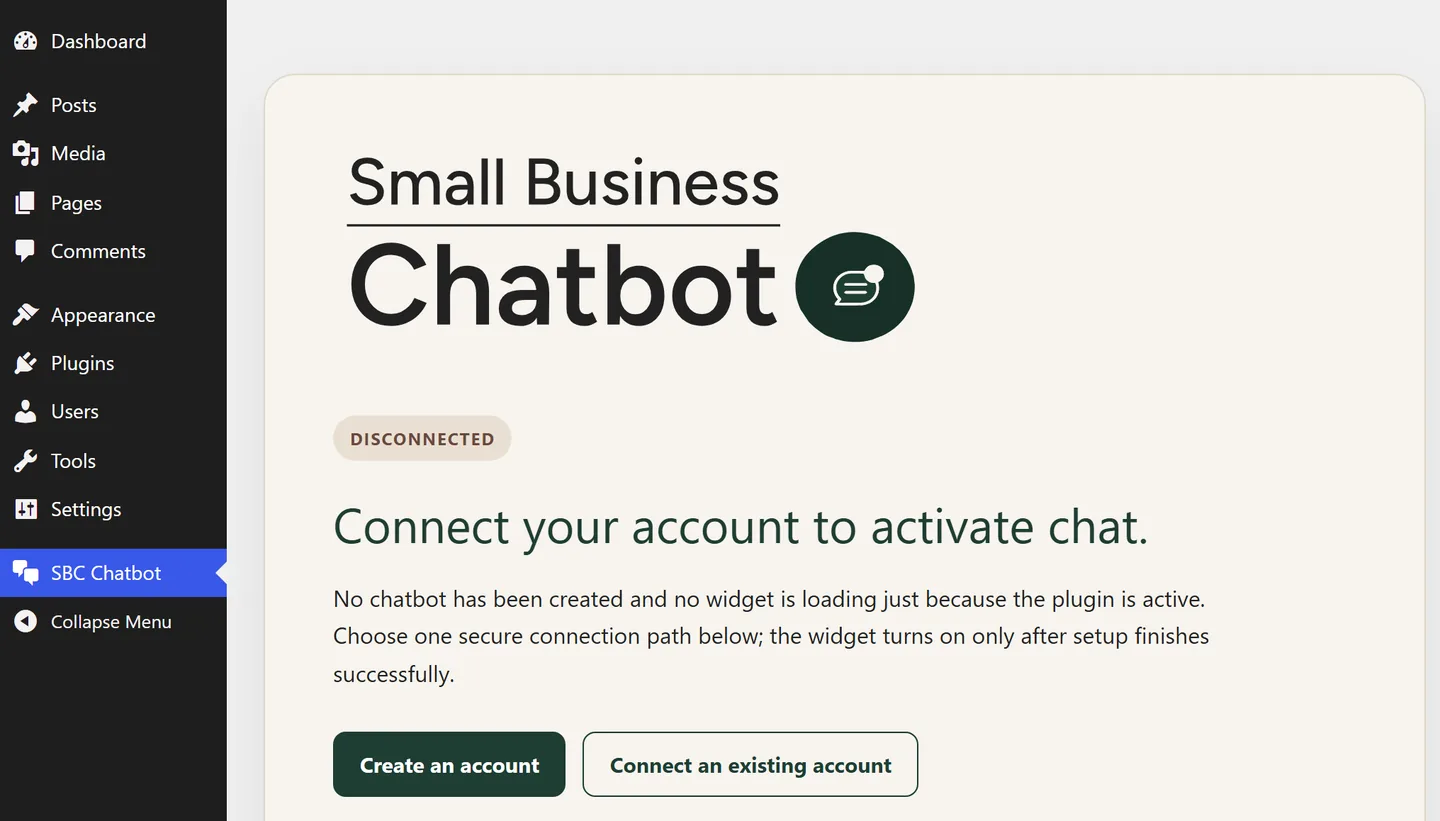
- Create an account or connect one. Click “Create an account” if you’re new, or “Connect an existing account” if you already use Small Business Chatbot, and sign up or sign in on smallbusinesschatbot.com. On a plugin where you bring your own AI key, this is the step where you paste the AI company’s key and choose a model instead.
- Approve your site. A page asks “Connect this site to your account?” and shows your site’s address. Check it’s your site, then click “Approve and connect”. Finish within ten minutes of step 3, or start again from SBC Chatbot.
- Check the chat on your site. You return to SBC Chatbot, which now reads “Connected” and “Your chatbot is live on this site.” Open your site in a private window: the chat launcher sits in the bottom-right corner. A new account also starts reading your site’s pages, so the chatbot can answer from them.
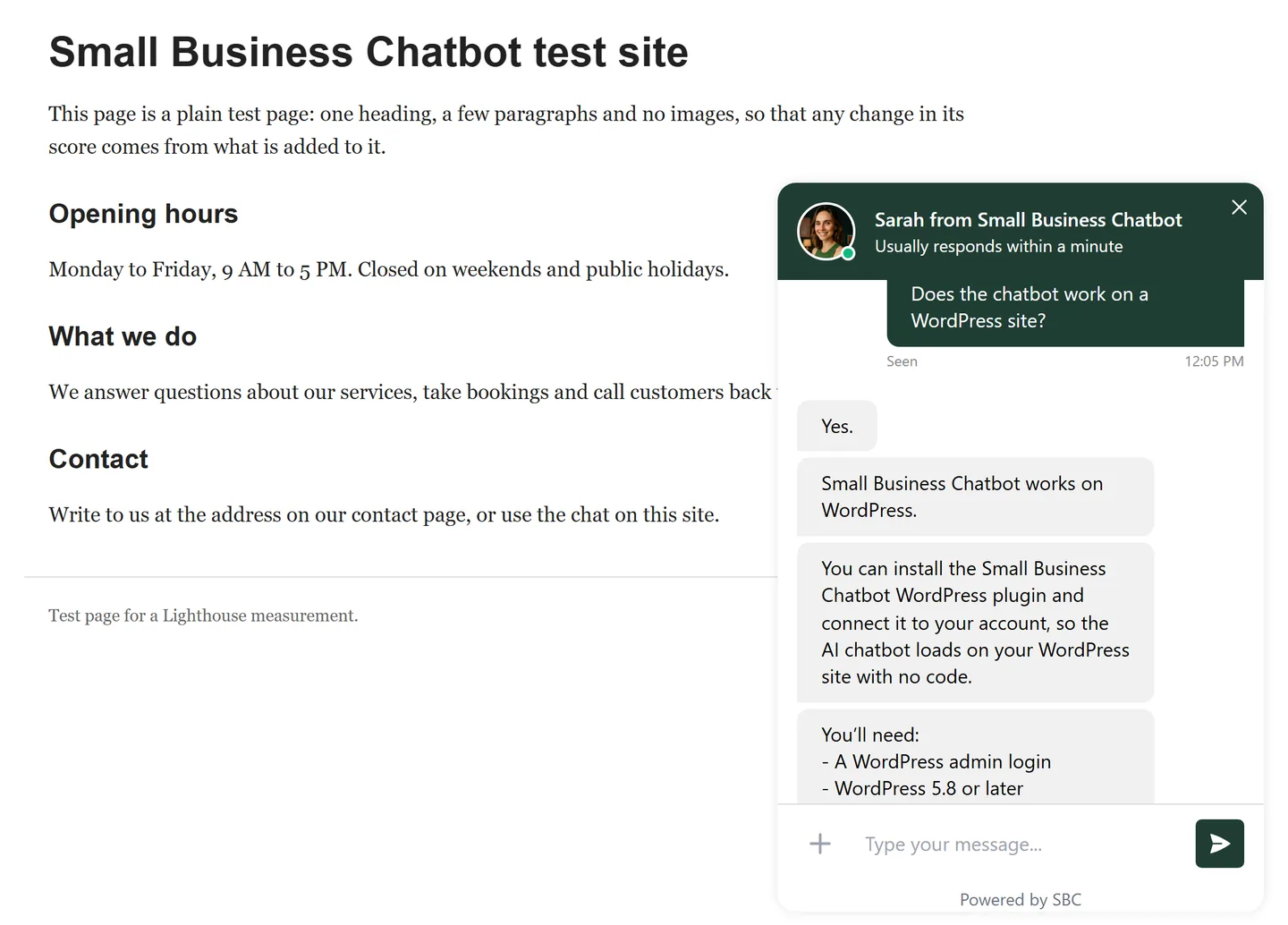
From “Open platform” you change how the chat looks, what it knows and what it asks.
Not on WordPress? On Shopify, Wix, Squarespace or any site that accepts code, the chatbot goes in with one line of code: add the chatbot to any website.
My take: count the ways customers reach you
If your staff will answer every chat, a free live chat box is enough. If an AI should answer, pick a hosted chatbot unless you want to bring your own AI key and watch the AI company’s bill. Then count the ways customers reach you: if they also call or text, pick one that answers all three.
How we chose and checked the ten
- Chose the ten.We started from WordPress.org’s results for “chatbot” and the plugins Google’s AI answer names for “wordpress chatbot” (AI Engine, WPBot, Jotform and tawk.to), and kept ten that cover the three kinds.
- Read every price on the company’s own page.On Nov 23, 2026, with monthly billing selected, and noted the yearly price beside it.
- Took installs, ratings and update dates from WordPress.org.On Nov 23, 2026, for the nine other plugins. Ratings are WordPress.org’s 100-point score shown out of five.
- Described Small Business Chatbot’s plugin from its code.Version 1.1.1, installed from Plugins › Add New on a fresh WordPress Playground site.
- Didn’t install the other nine.What they do is what their own pages say.
- Who publishes this page.Small Business Chatbot publishes it and makes one of the ten plugins.
Where each price was read
- AI Engine: meowapps.com/ai-engine and wordpress.org/plugins/ai-engine
- Chatbase: chatbase.co/pricing
- Crisp: crisp.chat/en/pricing
- Hyve: themeisle.com/plugins/hyve
- Jotform AI Chatbot: jotform.com/pricing and wordpress.org/plugins/jotform-ai-chatbot
- MxChat: mxchat.ai and wordpress.org/plugins/mxchat-basic
- Small Business Chatbot: smallbusinesschatbot.com/pricing
- tawk.to: tawk.to/why-free
- Tidio: tidio.com/pricing, with Lyro selected
- WPBot: wpbot.pro/pricing and wordpress.org/plugins/chatbot
Questions about WordPress chatbots
Is there a free AI chatbot for WordPress?
Yes. Tidio’s free plan includes 50 AI conversations in total, Jotform’s free plan 100 a month, and tawk.to’s AI Assist has a forever-free plan for sites with little chat. The four plugins where you bring your own AI key are free to install, and the AI company bills each message.
Is there a ChatGPT WordPress plugin?
Yes. Four plugins in the table run on an OpenAI key you supply: AI Engine, Hyve, MxChat and WPBot.
Which WordPress chatbots work with WooCommerce?
MxChat’s WordPress.org listing offers WooCommerce product training and an add-on for shopping help, and WPBot’s lists a Pro shopping assistant for WooCommerce. Both say they read your product catalog.
Put an AI chatbot on your WordPress site
Enter your website and see Small Business Chatbot answer from your pages.
Or call our AI receptionist now: (646) 759-1090
Arthur Cockfield
Arthur Cockfield is the co-founder of Small Business Chatbot, which builds AI receptionists for small businesses. Before that he was an early employee and Head of Growth at OneLocal (YC S17), where he helped hundreds of service-based small businesses with their marketing.