Google Local Services Ads (LSA): how they work in 2026
Google Local Services Ads are paid listings for local service businesses on Google Search and Google Maps. You pay for each lead, which is a call, a message or a booking from the ad, and nothing for clicks. Since 2024 the badge, lead disputes, where you manage your account and what Google charges for a missed call have all changed.

What are Google Local Services Ads?
Local Services Ads, also called Local Service Ads, LSA or LSAs, are Google’s pay-per-lead ads for local service businesses. Each listing is built from your Google Business Profile: your name, rating, reviews and hours come from there. Google screens every business before its ad can carry the Google Verified badge.
What changed for Google Local Services Ads since 2024
Four rules changed. A guide that tells you to dispute a bad lead, or to earn the Google Guaranteed badge, was written before them.
- One badge. Google Guaranteed gave way to a single Google Verified badge, and the money-back guarantee ended. The badge
- No manual disputes. You can’t dispute a lead by hand any more. Google credits bad leads automatically. Disputes and credits
- Managed in Google Ads. Since August 2026 Google has been moving accounts out of the Local Services dashboard and into Google Ads. What changes and when
- Missed calls. Since October 2026 a call you miss in your business hours can be charged as a lead. Which calls are charged
How Google Local Services Ads work
A customer searches Google for a service in their area, sees your ad in the results and contacts you from it.
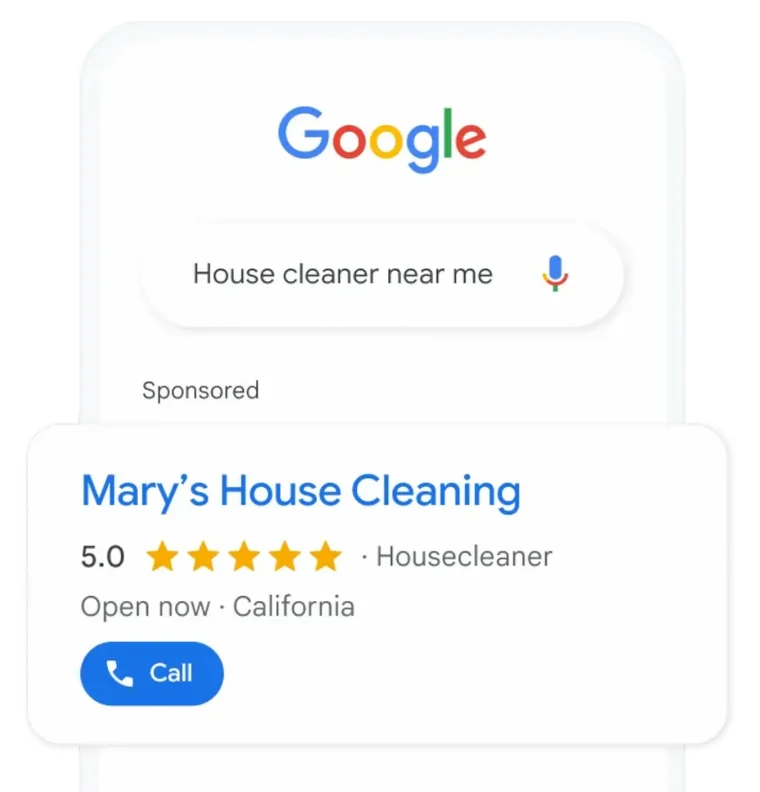
- The search. Someone looks for a service you offer in an area you serve. Google matches the search to your service categories and service area.
- The ad. Your listing is shown prominently in the results with your business name, star rating, number of reviews, hours and, if you have one, your badge.
- The contact. The customer calls, sends a message or books. How each reaches you
Who can run Local Services Ads: eligible businesses and countries
Local Services Ads are open to businesses in the categories Google lists. Its list of home services has 37 entries, from appliance repair to window repair. The full list also takes in lawyers, real estate agents, financial planners, health care, child care, pet care, beauty and auto services, and a few categories are offered only in certain states.

The ads run in eleven countries: Austria, Belgium, Canada, France, Germany, Ireland, Italy, Spain, Switzerland, the United Kingdom and the United States. Categories differ by country, and this guide is written for the United States. In Canada the ads are still managed in the Local Services dashboard until the move in 2027.
How to get verified and set up Local Services Ads
Most of the setup is Google’s screening. Verification takes three to four weeks on average after you submit your documents.
- Check your category. Find your trade on Google’s list of categories.
- Verify your Google Business Profile. A verified, public profile is required.
- Sign up. New accounts start on Google’s Local Services sign-up page, even though existing accounts are moving into Google Ads.
- Send what screening asks for. Depending on your category and state: business registration, licences, insurance, an identity check and background checks, which cost you nothing. Locksmiths and garage door companies also have a video interview.
- Set up billing and a budget. Google needs both before your ad can run.
- Go live. When the checks are complete, your ad runs with the Google Verified badge. Google can repeat a check later.
Some US businesses are offered accelerated verification: the badge arrives quickly, and they have 14 days to finish the remaining steps.
Google Verified: the badge that replaced Google Guaranteed and Google Screened
Google Guaranteed is no longer available. Local Services Ads now carry one badge for all advertisers, Google Verified, which a business earns by passing Google’s screening. Businesses that were already verified received it without doing anything.
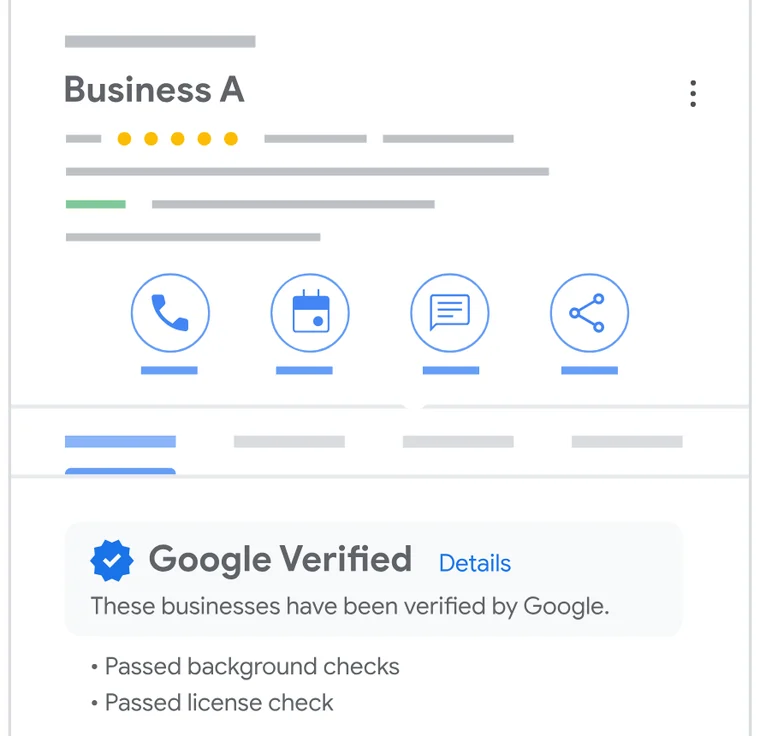
The money-back guarantee went with the old badge: Google took reimbursement requests only for services booked through Local Services Ads before December 7, 2025.
With one badge for every advertiser, there is no separate Google Screened badge for professional services. The badge sits next to your business name on your Local Services profile, with the checks you have completed. The switch did not change ad rankings, and some categories, dining among them, run without a badge.
What counts as a lead on Local Services Ads
A lead is a customer contacting you through your ad in one of three ways: a phone call, a message or a booking. Google charges for valid leads only.
| Lead | What the customer does | How it reaches you | After the move into Google Ads |
|---|---|---|---|
| Phone call | Calls the number on your ad | Google’s forwarding number rings your phone | Always on |
| Message | Sends a text or an email from the ad | By email, and in the US by text. You reply from the Leads page or to the notification | You choose |
| Booking | Asks for a time from the ad | Through a booking partner you connect, in the US | You choose |
A message lead is usually priced below a phone lead. See which calls are charged and what Google credits.
How much do Google Local Services Ads cost?
Local Services Ads are not free: you pay Google for each valid lead. Google publishes no price list. A lead’s price depends on your location, the job type, the type of lead and how you bid.
Your budget sets the most a month can cost. You choose it from the number of new leads you want each week, and you can change it at any time. In the Local Services dashboard it is an average weekly budget with a monthly maximum. Once an account moves into Google Ads it becomes a daily average, which is the weekly figure divided by seven.
Every lead counts toward the budget, whatever its type. When the month’s maximum is spent, your ad stops showing until the next month unless you raise it.
Bidding decides what you offer for a lead. You can let Google get the most leads your budget allows, which is what it recommends, or set a target cost per lead.
Billing runs through Google Ads. Your card or bank account is charged when you reach a payment threshold or 30 days after your last payment, whichever comes first.
Which Local Services Ads calls Google charges for
A call you answer is judged on the conversation and charged when it is a valid lead. Since October 2026 a call in your business hours that nobody answers is charged too, once the caller has stayed on the line for more than 20 seconds.
| The call | Is it charged? |
|---|---|
| You answer, or you call the customer back and speak to them | Yes, when it is a valid lead. Google judges it on the conversation, however long the phone rang |
| Nobody answers in your business hours, and the caller stays on the line more than 20 seconds | Yes |
| Nobody answers, and the caller hangs up within 20 seconds | Not as a missed call. If you then speak to that customer, the call is judged as an answered one, and you are charged once if it is a valid lead |
| It reaches voicemail or a recorded greeting in your business hours | Yes, once the caller has stayed on more than 20 seconds, whether or not they leave a message |
| It reaches a phone menu that asks the caller to press a key | No, if the caller hangs up without pressing a key. Yes, if the call lasts more than 20 seconds after their first key press |
| It comes outside your business hours or your ad schedule | Not as a missed call. A voicemail the customer leaves still counts as a valid lead |
| The same customer contacts you again within 15 days | No. One charge covers later calls and messages from the same phone number or email address |
Business hours are the hours in your Google Business Profile. If your ad schedule is different, an unanswered call is charged only when it falls inside both.
Each lead’s status (Charged, Not charged, In review or Credited) is in the Charge Status column on the Leads page in Google Ads.
Can you dispute a Local Services Ads lead? Credits and spam calls
You can no longer dispute a lead by hand. Google’s systems decide which leads are invalid, before the charge and for 30 days after it, and credit your account automatically.
The way to flag a lead now is to rate it. The “Rate this lead” survey on the Leads page starts an automated review and may bring a credit. Use it when a call looks fake, such as a caller who rings only to use up your budget.
Spam, sales calls and wrong numbers are filtered out when the contact first comes in. Google also watches for robocalls and for calls that drop the moment they connect.
A charged lead is reviewed again over the next 30 days. If Google judges it poor quality, a duplicate or invalid, the credit goes to your account balance, usually within 30 days. The original charge still shows on the invoice.
Two kinds of lead aren’t credited: a job type you don’t offer and an area you don’t serve. To get fewer of those, narrow your service types and service areas in the campaign settings. Health care businesses and tax specialists get no lead credits at all.
How Google ranks Local Services Ads
Google ranks the ads in an auction on your bid and the quality of your profile, and on how well your business fits the search.
- Your bid. What you offer for a lead, set as described under cost.
- Reviews. Your star rating and number of reviews count toward profile quality, and some business types need five reviews before the ad will show. Our free Google review link generator makes a link you can send to customers.
- Responsiveness. How often and how quickly you respond to calls and messages. Missed calls may count against it.
- Verification and photos. The checks you have completed and good photos add to profile quality. A stronger profile may rank higher and pay less per lead.
- Message and booking leads. With these switched on, a search is more likely to become a lead, and Google counts that likelihood when it ranks your ad.
- The search. The job the customer wants, the time they search and their location decide how relevant your business is.
Google’s ranking page doesn’t list business hours as a factor. They decide whether your ad shows at all: outside your hours it doesn’t appear with its badge, though Google may show a free version of the listing.
Local Services Ads are moving into Google Ads: what changes and when
Since August 2026 Google has been moving Local Services Ads accounts into Google Ads, where each becomes a Performance Max campaign with pay-per-lead goals. You still pay per valid lead, the ads still show only on Google Search and Maps, and there are still no keywords. Your verification and badge carry over.
- August 2026: selected US home and storefront services, including plumbing, HVAC, electrical, appliance repair, house cleaning, lawn care, roofing, pest control and moving.
- Late 2026: businesses that travel to their customers and have no storefront, professional services, and accounts with custom bidding or booking set-ups.
- 2027: accounts outside the US and every remaining category, including health care, locksmiths and garage doors.
Google emails you 14 days before your date, shows a banner in the old dashboard, and emails again when the move is done.
Afterwards bidding by a maximum price per lead ends, and separate targets for each category merge into one. Your lead inbox becomes the Leads page. Your business name, address and hours are edited in your Google Business Profile, not in Google Ads.
Save your reports before your date. Past performance reports (impressions, clicks, weekly spend) do not move across. The redirection page offers a download of your lead totals: total lead spend and the number of charged leads, split by phone, message and booking. Your lead history, message threads and call recordings do carry over. Allow up to two weeks for performance to settle.
Local Services Ads vs Google Ads: the difference
Local Services Ads charge for each lead, and a standard Google Ads campaign charges for each click. A migrated Local Services account is itself a Google Ads campaign, so the table compares it with one you pay for by the click.
| Local Services Ads | A pay-per-click Google Ads campaign | |
|---|---|---|
| What you pay for | Each valid lead: a call, a message or a booking | Each click on your ad, whether or not the person contacts you |
| Where the ad shows | Google Search and Google Maps only | A Performance Max campaign runs across Google’s ad networks, including YouTube, Gmail and the Display Network |
| Keywords | None. Google uses your service categories, service area and Business Profile | You choose the keywords in a Search campaign |
| Badge | Google Verified, after screening, in the categories that offer it | None |
| Setup | Built from your Business Profile once you pass screening | You enter your business details and set up bidding yourself |
Are Google Local Services Ads worth it?
Local Services Ads are worth it when what you pay Google to win one job is well under what the job brings in. You can check that with two numbers of your own.
A month’s lead spend ÷ the jobs those leads became = what one job cost you in leads
If the month’s lead spend was $1,200 and eight of those leads became jobs, each job cost $150 in leads. Set that against what an average job brings in.
Your account shows the month’s lead spend and its charged leads. The count of jobs is yours. If you haven’t started, you have neither number yet. Your budget caps what the first month can cost, so run the sum at the end of it.
Local Services Ads are a poor fit when a job brings in little more than its leads cost, when your category or area isn’t on Google’s list, or when you don’t hold the licence and insurance that screening asks for.
Who answers the calls your Local Services Ads send?
Google charges for the lead either way once a real caller stays on the line. What you choose is whether that charge buys a ring, a voicemail or a booked job.
A missed call in your business hours can be a lead you pay for and a job you didn’t get to quote. It can also cost you position, because Google counts responsiveness when it ranks your ad.
- Your own phone. It works when you can pick up. On a roof or under a sink, it rings out.
- Voicemail. The caller gets a recording and decides whether to leave a message or try the next ad.
- A front desk or a live answering service. A person answers during the hours you staff or pay for. What each costs is in our answering service guide.
- An AI answering service. It picks up at any hour.
Small Business Chatbot is an AI answering service for small businesses. Here its AI receptionist, Sarah, takes a call from a homeowner who found a plumber on Google and whose water heater has stopped heating.
A water heater call: the visit is booked before the caller hangs up
- Sarah
Tamarack Lane Plumbing, this is Sarah. How can I help?
- Caller
Uh, hi, yeah, um... so my water heater, I think it quit sometime last night. Cold shower this morning, I went down and stared at the tank like that was gonna do something, and, uh, yeah. I found you guys on Google. I just wanted to see what it costs to have someone come out and take a look.
- Sarah
Oh man, a cold shower in November is rough. We can get someone out to take a look. A service visit runs $95, and that comes off the bill if you go ahead with the repair. The plumber will check the heater and give you a quote before any work. Want to set up a time for us to come by?
- Caller
Uh, yeah, no, not now, bud, I’m on the phone. Sorry. Um, that sounds okay. Can you, uh, do you guys have anything tomorrow? Morning if possible.
- Sarah
Sure, let me see what’s open tomorrow morning. One sec. The openings are Tuesday, November 24 at 9 AM, 9:30 AM, or 10 AM. Any of those work for you?
- Caller
Okay, yeah, nine works.
- Sarah
Got it. And your name?
- Caller
Yeah, it’s Dan Whitaker.
- Sarah
Thanks, Dan. What’s the address where we’ll be heading?
- Caller
It’s two twenty... no, sorry, 212 Maple Hollow Road.
- Sarah
Just to confirm, should I book Tuesday, November 24 at 9 AM at 212 Maple Hollow Road?
- Caller
Yes.
- Sarah
You’re booked for Tuesday, November 24 at 9 AM at 212 Maple Hollow Road. The plumber will show up at that time, take a look at the water heater, and quote you before any work. You’re all set, have a warmer day ahead.
- Caller
Okay, great, thanks, bye
- Sarah
No problem, Dan. Take care, bye.
She gave the visit price from the business’s own answers, offered the next morning’s openings, asked for the name and the address, and read the booking back before making it. On your line she follows the rules you set and books like this when phone booking is on and Google Calendar or Outlook is connected. When each call ends, you get an email with the action items and the full transcript.
Google’s forwarding number rings your business line, so call forwarding on that line, set with your phone carrier for every call or only the ones you don’t pick up, sends those calls on to her. If you have a front desk that answers, keep it and forward the rest.
A text sent after a missed call can win a caller back. It doesn’t change what Google charged for the call. The missed-call revenue calculator puts a dollar figure on the calls nobody answered.
By trade: plumbers, HVAC, electricians, roofers and pest control.
Questions about Google Local Services Ads
Where do I log in to Local Services Ads now?
In Google Ads, once your account has been migrated. Signing in to the old Local Services dashboard takes you there, and your leads are under Goals, then Conversions. Accounts that haven’t been moved yet, and accounts outside the United States, still use the Local Services dashboard.
Am I charged when an existing customer calls my ad?
Not on a search for your business by name. On those searches, Google asks the caller whether they are a returning customer and doesn’t charge for the call if they say yes.
Does Google record Local Services Ads calls?
Yes, in the United States and Canada. Google records every call that comes through the forwarding number on your ad, and a recorded message tells the caller first. Health care businesses and tax specialists are the exception.
Can I get leads before my verification is finished?
Often, yes. Once the preliminary checks pass, your ad can run without the badge while you finish the rest. Those checks are your licence or business registration, the reviews your category needs, billing and a budget. A pre-badge ad is placed below businesses that are fully verified, and garage door services, health care businesses and locksmiths have to finish first.
How we checked this guide to Local Services Ads
- Google’s own pages.Each rule was read on Google’s Local Services and Google Ads help pages on November 22, 2026, and we kept a dated copy of every page.
- Two dates from the trade press.Google’s pages give no start date for the missed-call charge and no date for the end of manual disputes. October 2026 is from Google’s email to advertisers, and 2024 is the year Google said automatic credits would replace manual disputes, each as Search Engine Roundtable reported it. The first source is under the table of charged calls and the second is in the list below.
- The pictures.All three pictures are screenshots of Google’s public pages: two from its Local Services Ads page, taken on November 22, 2026, and one from its help page on the Google Verified badge, taken on November 23, 2026.
- How AI was used.AI research tools read Google’s pages and drafted this guide. Arthur Cockfield reviewed and edited it.
- Re-checks.Google was still rewriting these pages in autumn 2026. When the pages are read again, the date at the top changes.
Sources, read November 22, 2026
- How leads work
- About Automated Local Services Ads lead credits
- Lead quality and budgets for campaigns with pay-per-lead goals
- Local Services Ads transition to Performance Max campaigns with pay-per-lead goals
- About pay-per-lead goals for Performance Max campaigns
- Supported business verticals for Performance Max campaigns with pay-per-lead goals
- About ad rankings
- About Google Verified badge
- Getting started with Local Services Ads
- Local Services Ads overview
- Understand the screening and verification process
- Business screening and verification requirements
- Manage leads and jobs
- How bidding works for Local Services Ads
- Improve your Local Services Ads performance
- Why aren’t my Local Services Ads running?
- How to pay for Local Services Ads
- About direct business search
- Google’s Local Services Ads page
- Search Engine Roundtable, June 25, 2024, for the 2024 end of manual disputes
See how Small Business Chatbot would answer your calls
Paste your website and Sarah, our AI receptionist, builds a preview from it. No signup.
Or call her now: (646) 759-1090
Arthur Cockfield
Arthur Cockfield is the co-founder of Small Business Chatbot, which builds AI front-desk assistants for small businesses. Earlier he was an early employee and Head of Growth at OneLocal (YC S17), where he worked with hundreds of service-based small businesses on their marketing.