Best AI receptionists for small businesses: the top 14 picks
Fourteen AI receptionists for small businesses, each priced at the same 100 calls a month, and the three to try first.

What an AI receptionist costs a month
Bills by
| AI receptionist | Bill |
|---|---|
 MarlieBasic, 250 minutes + 50 extra minutes · bills by the minute |
$66.50 |
 UpfirstPremium, 90 calls + 10 extra calls · bills by the call |
$69.95 |
 GoodcallStarter, 100 callers · bills by the caller |
$79 |
 KaicallsKai Line, about 170 calls · no price is published past that, and the plan can be kept |
$79 † |
 TrilletJuney, 150 minutes + 150 extra minutes · bills by the minute |
$79 |
 NextivaXBert AI Employee, 100 conversations · bills by the conversation |
$99 |
 Small Business ChatbotSelf Serve, 100 calls · bills by the call |
$99 |
 My AI Front DeskBusiness-in-a-Box, 200 minutes + 100 extra minutes · bills by the minute |
$114 |
 DialzaraBusiness Pro, 220 minutes + 80 extra minutes · bills by the minute |
$135 |
 RingCentralAI Receptionist, standalone, 100 minutes + 200 extra minutes · bills by the minute |
$149 |
 RosieScale, 1,000 minutes · bills by the minute |
$149 † |
 Moneypenny100 calls · bills by the call |
$199 |
 NextPhonePro, unlimited calls · a flat price |
$199 |
 Smith.aiPro, 75 calls + 25 extra calls · bills by the call |
$212.50 |
The best AI receptionist for what you need: three to try
The best AI receptionist or AI answering service comes down to what you need it to do. Each of these three fits a different need.
- If customers also text you and use your websiteSmall Business ChatbotA customer who texts tonight and calls tomorrow reaches the same receptionist, with the booking in front of her.
- If you only need the phone answeredUpfirstEvery plan books, transfers and texts, and no other plan that books costs less at 100 calls a month.
- If you want one price however many calls come inNextPhoneOne flat price for unlimited calls of any length, on a plan that books, transfers and texts. The bill is the same in a slow month and a busy one.
What to look for in an AI receptionist plan
Most AI receptionists cost about the same, so check these three things before you choose.
- Check that the plan books appointments. Most plans book into your calendar and can pass a call to you. On three of the fourteen, the cheapest plan only takes messages, and booking costs more. If you want appointments booked, compare the price of the plan that books.
- Work out how you’ll be charged. Six charge by the minute, five by the call, and the other three by the caller, by the conversation or at one flat price. Long calls only cost more on the plans that charge by the minute.
- Decide if you need more than the phone. Ten of the fourteen can text the caller, usually a booking link or a confirmation. Five also answer chats on your website. If your customers text you or use your website, look for these.
The 14 AI receptionists and what each plan does
Small Business Chatbot
Try firstIf customers also text you and use your website
Small Business Chatbot’s AI receptionist, Sarah, answers your phone, your business text number and a website chat that stays open 24 hours a day. It suits a service business whose customers reach it more than one way and want the same receptionist each time.
- At 100 calls a month
- $99
- Bills by
- the answered call
- Try it
- 7-day free trial of the website chat, no card
- Books into your calendar
- yes (Google Calendar, Outlook)
- Passes a call to a person
- yes, when the caller asks
- Texts the caller
- yes, and answers their texts
- Website chat
- yes, 24 hours a day
Pros
- Books into Google Calendar and Outlook. Small Business Chatbot checks your free times and books into your connected Google Calendar or Outlook calendar on a call, by text or in the website chat.
- The booking follows the customer. Someone who books by text tonight and calls tomorrow reaches the same receptionist, who has the visit in front of her and can move it on the call.
- Looks things up during the call. Small Business Chatbot can search your website pages mid-call, and it follows the goals and rules you write in plain words.
- Reminders that follow the booking. Confirmations and reminders are tied to the appointment, so cancelling stops the pending ones and rescheduling moves them.
- One list of conversations. Calls, texts and website chats sit together in one inbox, each with its summary and full transcript.
Cons
- More than a phone-only business needs. If customers only ever call you, you would be paying for texting and website chat you won’t use, and some phone-only plans cost less.
- Self Serve is yours to set up. On Self Serve you write the goals, rules and answers yourself with email support, and having the team do it means the Managed plan at a higher price.
Small Business Chatbot’s plans
| Plan | A month | Each extra call |
|---|---|---|
| Self Serve, 100 calls (priced here) | $99 | $0.75 |
| Managed, 500 calls | $249 | $0.50 |
Small Business Chatbot pricing, checked Nov 6, 2026
Upfirst
Try firstIf you only need the phone answered
Upfirst is an AI answering service that picks up your calls and texts and books straight into your calendar. It suits an owner who wants to set it up themselves from a website address and keep adjusting it, and attorneys, property managers and contractors are among the businesses it is built for.
- At 100 calls a month
- $69.95
- Bills by
- the call
- Try it
- 14 days or 100 calls free, no card
- Books into your calendar
- yes (Google, Outlook, Calendly, Acuity, Square, Clio)
- Passes a call to a person
- yes, and tells you who is calling first
- Texts the caller
- yes, back and forth
- Website chat
- not listed
Pros
- More than 35 languages. Besides English and Spanish it covers more than 35 others, and it changes when the caller does.
- Books while the caller waits. It checks your calendar with the caller on the line, and a shop on Square or a law office on Clio can book straight into the tool it already runs.
- Lets you decide on a transfer. It tells you who is calling and what they need, so you can choose whether to take the call.
- Reads and updates your CRM. On every plan it can look up or change records during or after a call in any CRM with an API.
- Shows what wasn’t billed. Spam and calls under 15 seconds are labelled in your call log, so you can see which calls counted.
Cons
- People answer support on weekdays. Staff are there Monday to Friday, 9 to 6 Eastern, and an AI assistant covers the weekend.
- Done-for-you setup sits on the top plans. Having the team set up your integrations takes the Scale or Enterprise plan, and below that you do it yourself after a free 30-minute onboarding call.
Upfirst’s plans
| Plan | A month | Each extra call |
|---|---|---|
| Starter, 30 calls | $24.95 | $1.50 |
| Premium, 90 calls (priced here) | $59.95 | $1.00 |
| Pro, 300 calls | $159.95 | $0.75 |
| Scale, 600 calls | $299 | $0.70 |
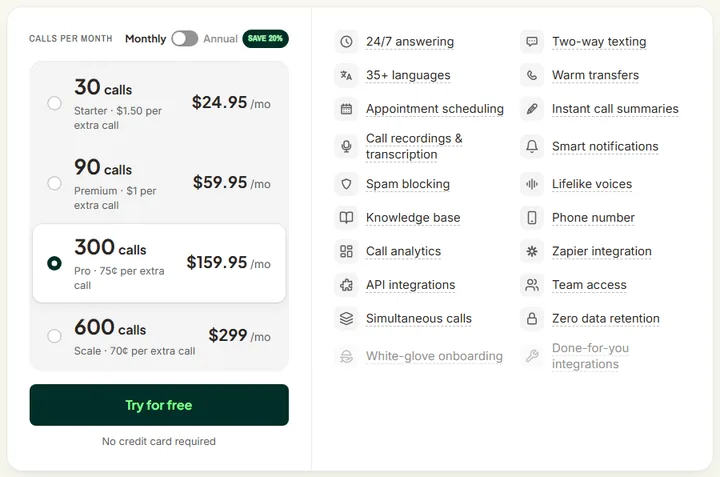
Upfirst’s pricing page, checked Nov 6, 2026
NextPhone
Try firstIf you want one price however many calls come in
NextPhone is an AI receptionist for law firms, accounting and insurance offices, and home-service trades such as HVAC and plumbing. It suits a business whose first calls need real intake and that wants the same bill every month.
- At 100 calls a month
- $199
- Bills by
- a flat price, unlimited calls
- Try it
- 7 days free
- Books into your calendar
- yes (Google, Outlook, Calendly, Acuity, Cal.com, OnceHub)
- Passes a call to a person
- yes, to up to 10 people
- Texts the caller
- yes, links and confirmations
- Website chat
- not listed
Pros
- Asks only what fits the call. It works through your intake questions, skips what doesn’t apply and flags what’s urgent.
- A message when nobody picks up. If a transfer isn’t answered, it takes a detailed message so the caller isn’t left stuck.
- Remembers repeat callers. The plan priced here keeps track of people who have called before.
- Thirty voices, 14 languages. You choose the voice that sounds right for your business from a list of 30.
Cons
- Your CRM waits for the next plan. Updating your CRM after each call, and connecting through Zapier, start on Growth.
- Back-and-forth texting is on the top plan. Holding a two-way text conversation from your business number starts on Scale.
- A quiet month costs the same. The price doesn’t drop when the phone is slow, so a business with few calls pays for room it won’t use.
NextPhone’s plans
| Plan | A month | Each extra call |
|---|---|---|
| Pro, unlimited calls (priced here) | $199 | None |
| Growth, unlimited calls, set up for you | $299 | None |
| Scale, unlimited calls | $599 | None |
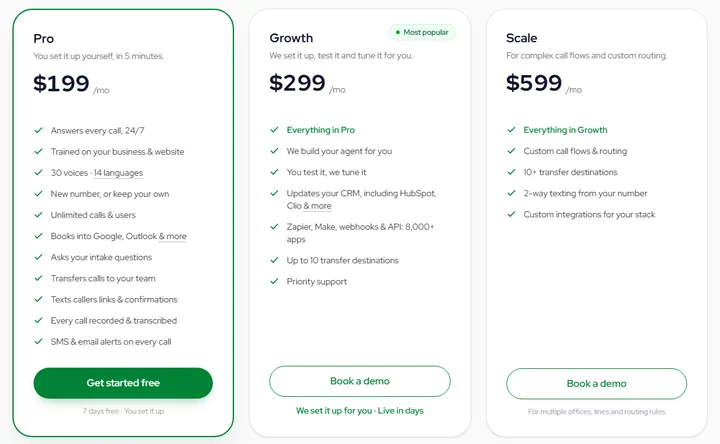
NextPhone’s pricing page, checked Nov 6, 2026
Dialzara
Dialzara is an AI receptionist for small businesses that can’t answer every call themselves, with texting and a website chat trained on the same business information. It suits an owner who wants to start on the phone and add channels later.
- At 100 calls a month
- $135
- Bills by
- the minute
- Try it
- 7-day free trial
- Books into your calendar
- yes (Google, Outlook)
- Passes a call to a person
- yes, and tells you who is calling first
- Texts the caller
- a paid add-on
- Website chat
- yes, 100 sessions a month
Pros
- Handles different calls differently. You set transfer numbers and conditions, with separate extensions for different kinds of call.
- Text that hands back to voice. Its texting agent holds two-way conversations, can book, and moves a customer between text and a call.
- After-hours rules. From the plan priced here you can set what happens after hours and when a call escalates.
- Over 50 voices, 10 languages. Every plan has the full choice of voices, with English and Spanish among the languages.
Cons
- Texting is metered on top. The texting agent carries a monthly fee, a charge for each AI message and carrier fees.
- The first prompt is yours to write. Having it set up for you starts on the Elite plan.
- More locations need a bigger plan. Running several agents or locations starts on the Plus plan.
Dialzara’s plans
| Plan | A month | Each extra minute |
|---|---|---|
| Business Lite, 60 minutes | $29 | $0.48 |
| Business Pro, 220 minutes (priced here) | $99 | $0.45 |
| Business Plus, 500 minutes | $199 | $0.40 |
| Business Elite, 1,000 minutes | $349 | $0.35 |
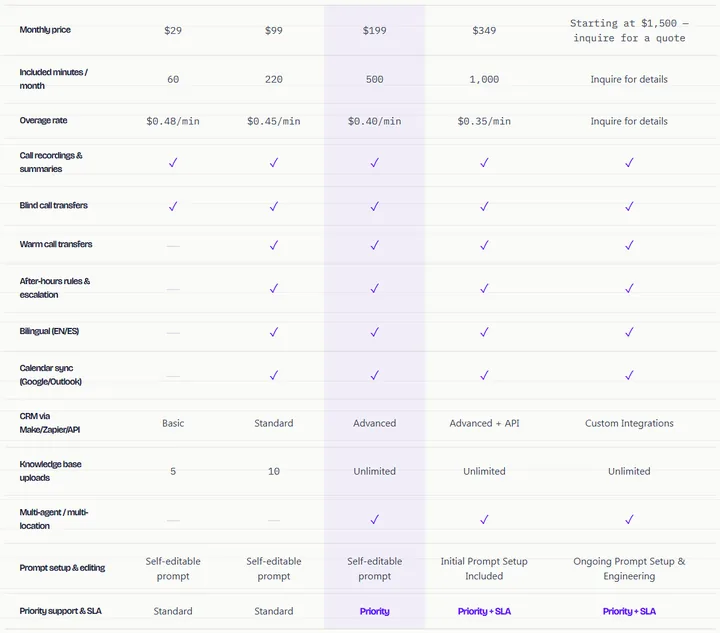
Dialzara’s pricing page, checked Nov 6, 2026
Goodcall
Goodcall is an AI phone agent you build by describing your business or handing over your website, with no code. It suits a solo operator or a busy shop whose customers ring more than once.
- At 100 calls a month
- $79
- Bills by
- each different caller
- Try it
- a free demo agent; you pay when you add a number
- Books into your calendar
- yes, Google Calendar
- Passes a call to a person
- yes, to the people you choose
- Texts the caller
- not listed
- Website chat
- not listed
Pros
- A backup when a transfer fails. Calls go to the right person, with a second person lined up if they don’t pick up.
- Measures you define. You can create your own metrics, such as booked appointments or missed leads, and watch them week to week.
- Every call on file. Each call is recorded and transcribed, so you can play it back and read it word for word.
- Links to HighLevel and Zapier. It can add call details to HighLevel and reach your other tools through Zapier.
Cons
- History is short on Starter. Call history on the plan priced here goes back 30 days.
- Starter is built for one person. It comes with one team member and one outside tool, and more of either means moving up.
Goodcall’s plans
| Plan | A month | Each extra caller |
|---|---|---|
| Starter, 100 callers (priced here) | $79 | $0.79 |
| Growth, 500 callers | $129 | $0.26 |
| Scale, 2,000 callers | $299 | $0.15 |
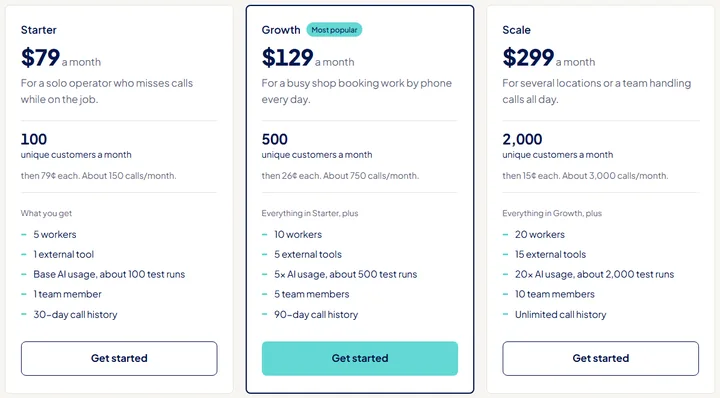
Goodcall’s pricing page and homepage, checked Nov 6, 2026
Kaicalls
Kaicalls gives you a phone line with an AI secretary, Kai, built in. It suits an owner who wants missed calls caught first and may later want follow-up, email campaigns and meeting notes in the same account.
- At 100 calls a month
- $79 †
- Bills by
- the answered call
- Try it
- $2 for the first week; 30-day money-back guarantee
- Books into your calendar
- yes, your connected calendar
- Passes a call to a person
- yes, puts the caller through
- Texts the caller
- yes, once your number is approved for texting
- Website chat
- not listed
Pros
- Your phone rings first. You forward only the calls you don’t pick up and Kai takes the rest, with your number and carrier staying the same.
- Several ways to put a call through. Kai can ring team members first, screen the caller, introduce them or transfer straight away.
- Calls customers back. Kai can ring customers back for you as well as answer them.
- Notes from your meetings. Kai joins your Zoom, Google Meet and Teams calls and takes the notes.
- No charge per team member. Every plan has unlimited team members with no seat fees.
Cons
- The call allowance is an estimate. If your calls stay above it you’ll be recommended the next plan, which you can turn down.
- The extras take setup of their own. Email campaigns need a verified sending domain and account approval before anything goes out.
- A second line is extra. Each additional phone line adds a monthly charge.
Kaicalls’ plans
| Plan | A month | Each extra call |
|---|---|---|
| Kai Backup, about 20 calls | $10 | No charge |
| Kai Line, about 170 calls (priced here) | $79 | No charge |
| Kai Office, about 800 calls | $349 | No charge |
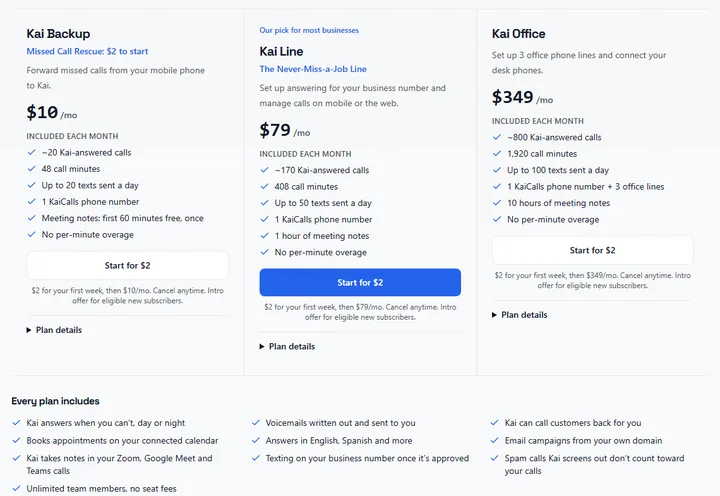
Kaicalls’ pricing page, checked Nov 6, 2026
Marlie
Marlie is an AI answering service built for service businesses, from locksmiths and plumbers to towing. It suits an owner who wants the receptionist built for them from a website or Google Business listing, with little to set up.
- At 100 calls a month
- $66.50
- Bills by
- the minute
- Try it
- 14-day free trial
- Books into your calendar
- from the next plan up
- Passes a call to a person
- from the next plan up
- Texts the caller
- yes, a link
- Website chat
- not listed
Pros
- Job details by text. Within seconds of hanging up, it sends the caller’s name, issue, location and urgency to your phone.
- Demo lines by trade. You can ring lines set up for towing, a locksmith and a law office to hear how each is handled.
- Live availability one plan up. On Standard it checks your real availability, books into Google Calendar, Outlook or Calendly, and reschedules for callers.
- Checkout links by text. From its Pro plan it can text callers a secure Shopify or Square checkout link.
Cons
- Actions are rationed per call. Basic can do one thing on a call, such as texting a link, and Standard can do three.
- One transfer number until Pro. Sending calls to different people or departments starts on the Pro plan.
- Training documents wait for Pro. Uploading your own documents and building a knowledge base start there too.
Marlie’s plans
| Plan | A month | Each extra minute |
|---|---|---|
| Basic, 250 minutes (priced here) | $49 | $0.35 |
| Standard, 500 minutes | $99 | $0.35 |
| Pro, 1,000 minutes | $199 | $0.30 |
| Premium, 2,000 minutes | $399 | $0.25 |
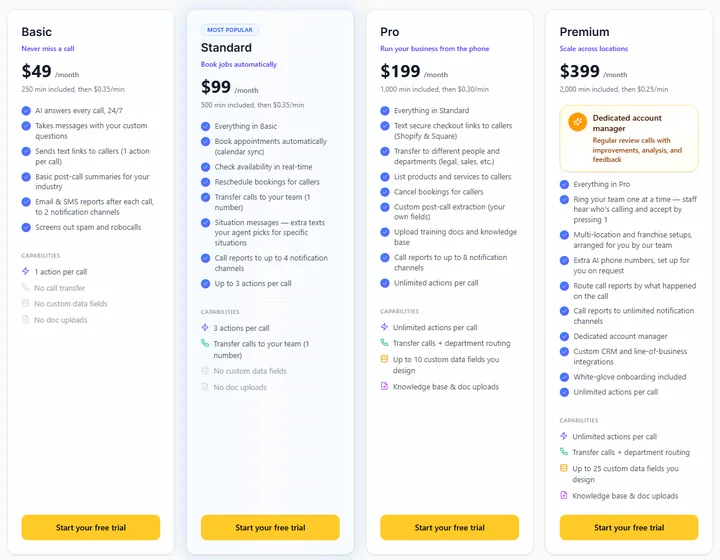
Marlie’s pricing page, checked Nov 6, 2026
Moneypenny
Moneypenny’s AI receptionist comes from a company that also runs a live receptionist team in the US, and you can combine the two. It suits a business that wants routine calls handled by AI and doesn’t want the AI going off script.
- At 100 calls a month
- $199
- Bills by
- the call
- Try it
- no free trial published
- Books into your calendar
- yes, with Calendly
- Passes a call to a person
- yes, to one of its receptionists or to your team
- Texts the caller
- not listed
- Website chat
- not listed
Pros
- Sticks to what you approved. It keeps to the answers you’ve signed off and doesn’t improvise.
- A person can step in mid-call. A call can go to your team or to a live Moneypenny receptionist, who picks up the conversation part way through.
- Summaries the way you want them. They arrive by email, text or both as calls happen.
Cons
- Thirty days to leave. Cancelling takes 30 days’ notice, effective from your next billing date.
- Not a same-day setup. Most clients are up and running within a few days.
Moneypenny’s AI receptionist plans
| Plan | A month | Each extra call |
|---|---|---|
| 50 calls | $99 | $2.39 |
| 100 calls (priced here) | $199 | $2.19 |
| 250 calls | $435 | $1.89 |
| 500 calls | $775 | $1.69 |
Moneypenny’s pricing page and its AI receptionist page, checked Nov 6, 2026
My AI Front Desk
My AI Front Desk, also called Frontdesk, is an AI receptionist sold as a bundle with website chat, two-way texting, a built-in CRM and follow-up automations. It suits an owner who wants to replace several separate tools with one account and run it themselves.
- At 100 calls a month
- $114
- Bills by
- the minute, in credits
- Try it
- 7-day free trial
- Books into your calendar
- yes
- Passes a call to a person
- yes
- Texts the caller
- yes, 400 texts a month
- Website chat
- yes, 100 conversations a month
Pros
- Makes calls as well as takes them. It can place up to 20 outbound calls a day, such as appointment reminders and follow-ups.
- Follow-up sequences included. You can build as many as you like, for example a text to a new lead and an email the next day if they don’t respond.
- A voice on your website. Visitors can talk to it in a voice chat on your site as well as on the phone.
- One memory for text, email and chat. The receptionist works from the same record across all three.
- Transfer or alert. If a call needs a person, it transfers the caller or sends you a real-time alert with the transcript.
Cons
- Two of each action. The plan allows two of each kind of action, such as transferring a call or sending a text.
- Only recent logs stay. You can look back over the last 200 calls, chats and other interactions.
- Plan credits lapse. The monthly credits for going over expire if you don’t use them.
My AI Front Desk’s plan
| Plan | A month | Each extra minute |
|---|---|---|
| Business-in-a-Box, 200 minutes (priced here) | $99 | $0.25 |
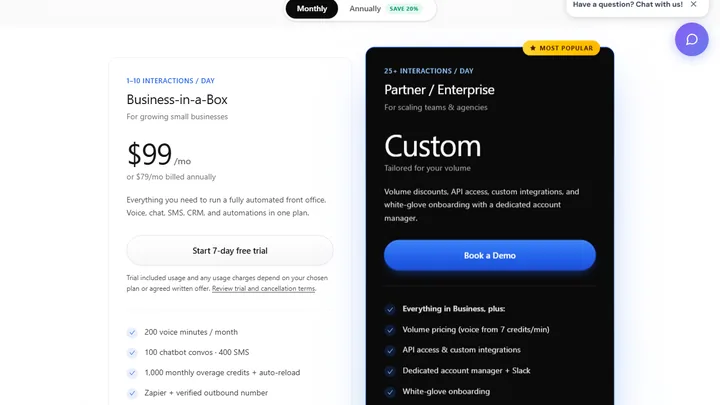
My AI Front Desk’s pricing page, checked Nov 6, 2026
Nextiva
XBert is the AI receptionist from Nextiva, a business phone company, and it covers calls, texts, web chat and messaging apps. It suits a business that may want its phones and its AI from the same supplier.
- At 100 calls a month
- $99
- Bills by
- the conversation
- Try it
- no free trial published; 30-day money-back guarantee
- Books into your calendar
- yes (Google Calendar, Calendly, Cal.com)
- Passes a call to a person
- yes, to your team
- Texts the caller
- yes
- Website chat
- yes
Pros
- Tools added on request. Beyond the ones ready now, such as Housecall Pro and Zoho, tools like Salesforce, HubSpot and ServiceTitan can be added in two to four days at no cost.
- Looks after the booking afterwards. It sends confirmation texts and handles requests to reschedule.
- Hands over the details. Before transferring, it captures what the caller needs and passes that to the right team member.
Cons
- Every channel draws on one allowance. A text or chat that gets three AI replies counts as a conversation, so a busy website chat uses up what your calls need.
- Past the allowance the rate goes up. Each extra conversation costs about half as much again as one inside the plan.
Nextiva’s plan
| Plan | A month | Each extra conversation |
|---|---|---|
| XBert AI Employee, 100 conversations (priced here) | $99 | $1.50 |
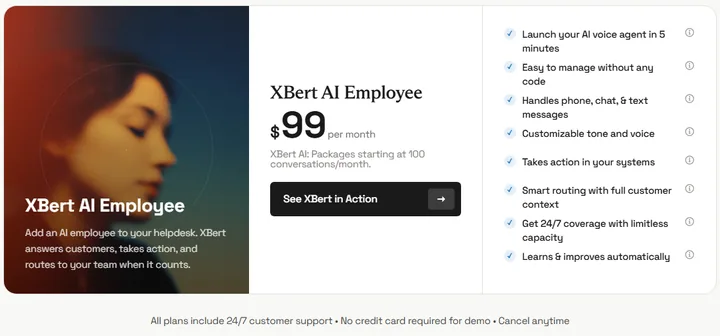
Nextiva’s pricing page and its AI receptionist page, checked Nov 6, 2026
RingCentral
RingCentral’s AI Receptionist comes from a business phone company and also works on its own with the phone system you already have. It suits an office with several people or locations that needs callers sent to the right one.
- At 100 calls a month
- $149
- Bills by
- the minute
- Try it
- 14-day free trial
- Books into your calendar
- yes (Google, Outlook)
- Passes a call to a person
- yes, to a person, an extension or an outside number
- Texts the caller
- yes, follow-up texts
- Website chat
- not listed
Pros
- Routes by name or intent. Callers are sent by name, location or keyword to a person, an extension, a queue or an outside number, with an AI summary attached.
- Hears the caller’s language. It detects the language from the first word and switches mid-call, across English, French, Spanish, Italian, German and Portuguese.
- Shows what it couldn’t answer. Its reports list unanswered questions and gaps, so you know what to teach it next.
- Set up by location. Each location can have its own routing, hours and answers.
Cons
- Time rounds up. Call time is billed in 30-second steps, rounded up, so short calls cost a little more than their length.
- Its texting agent may add to the bill. Additional charges may apply to the AI SMS agent.
- Some connections are still to come. WhatsApp, Calendly and Shopify are marked as coming soon.
RingCentral’s plan
| Plan | A month | Each extra minute |
|---|---|---|
| AI Receptionist, standalone, 100 minutes (priced here) | $49 | $0.50 |
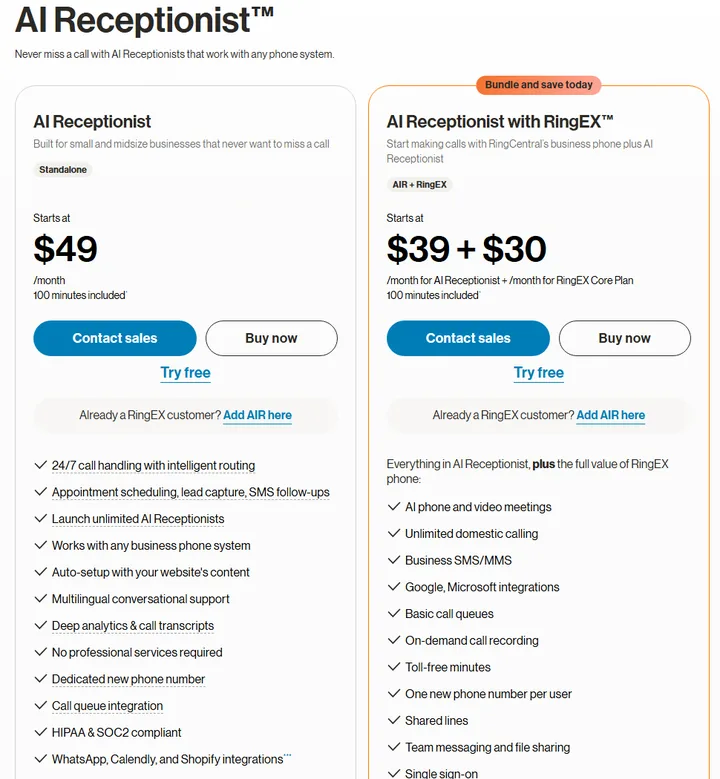
RingCentral’s AI Receptionist pricing page and product page, checked Nov 6, 2026
Rosie
Rosie is an AI answering service for small businesses, with its own iPhone and Android apps. It suits a solo owner or small shop that wants it working without technical help and checks calls from a phone.
- At 100 calls a month
- $149 †
- Bills by
- the minute
- Try it
- 7-day free trial
- Books into your calendar
- yes
- Passes a call to a person
- yes, and tells you who is calling first
- Texts the caller
- yes, during the call
- Website chat
- yes, a chat widget
Pros
- Learns from your Google profile. It picks up your hours, services and basics from your Google profile and website.
- Spanish on every call. Every plan speaks English and Spanish.
- Your own area code and agent name. You pick the area code for the number, and the name and greeting callers hear.
- Messages by scenario. The plan priced here lets you set up five kinds of custom message-taking.
- Alerts in the app. A summary, transcript and recording reach you by email, text and app when a call ends.
Cons
- Going over has no published price. No rate is given for a minute past your plan, so budget for the next plan up.
- Backup transfers start on Growth. Trying several numbers until someone answers, and uploading your own training documents, are held for that plan.
- Website texting is a paid add-on. Text conversations started from your website cost extra and come in a monthly bundle.
Rosie’s plans
| Plan | A month | Each extra minute |
|---|---|---|
| Professional, 250 minutes | $49 | Not published |
| Scale, 1,000 minutes (priced here) | $149 | Not published |
| Growth, 2,000 minutes | $299 | Not published |
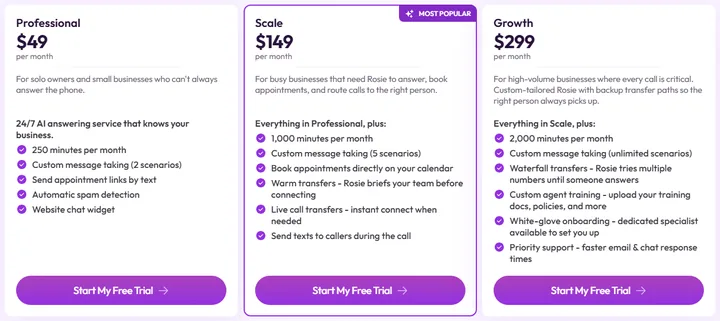
Rosie’s pricing page, checked Nov 6, 2026
Smith.ai
Smith.ai’s AI receptionist is built around client intake: it screens leads, takes the details and books consults. It suits a law firm or similar office, with the company’s live receptionists behind it for calls the AI shouldn’t take.
- At 100 calls a month
- $212.50
- Bills by
- the call
- Try it
- a free plan, 25 calls a month
- Books into your calendar
- yes (Calendly and more)
- Passes a call to a person
- yes, to Smith.ai’s own receptionists
- Texts the caller
- not listed
- Website chat
- not listed
Pros
- Test it before it goes live. Its Quality Studio runs a simulated test call and suggests fixes before callers reach it.
- Books into case management. Consults can go straight into your case management system, with Clio Grow, Clio Manage, Salesforce and HubSpot connected directly.
- Intake by service. You can tailor the questions for each service you offer.
- Robocalls blocked. More than 20 million known robocalls and solicitors are stopped before they reach you.
Cons
- Live help is charged by the call. Bringing in a live receptionist is a per-call add-on on any plan.
- Dedicated onboarding starts on Pro. Setup help and live phone, email and chat support aren’t on the free plan.
Smith.ai’s AI receptionist plans
| Plan | A month | Each extra call |
|---|---|---|
| Free, 25 calls | Free | $3.00 |
| Pro, 75 calls (priced here) | $150 | $2.50 |
| Pro, 150 calls | $270 (150 calls at $1.80 each) | $2.30 |
| Enterprise, 300 calls | $500 | $2.17 |
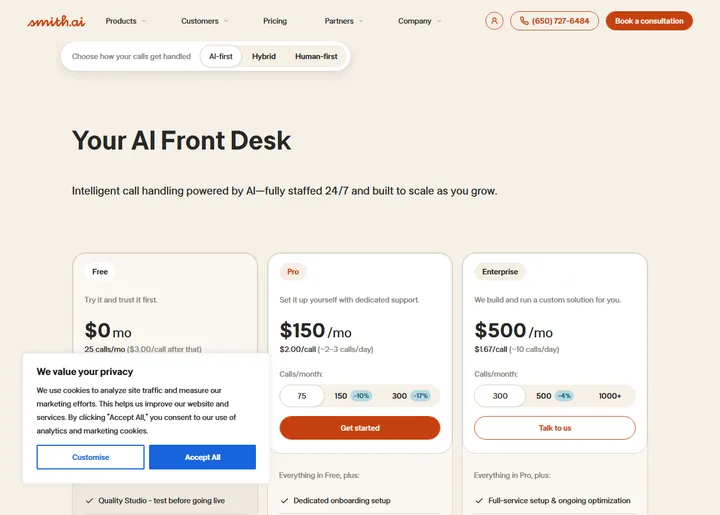
Smith.ai’s AI receptionist pricing page, checked Nov 6, 2026
Trillet
Juney is Trillet’s AI receptionist for owner-operators, set up and run from an iPhone or Android app. It suits someone on the job when the phone rings, from trades to salons and clinics.
- At 100 calls a month
- $79
- Bills by
- the minute
- Try it
- 7-day free trial with 50 minutes
- Books into your calendar
- yes, Google Calendar
- Passes a call to a person
- yes, urgent calls to one number
- Texts the caller
- yes, your booking link
- Website chat
- not listed
Pros
- A choice of accents. You pick an Australian, American or British voice and the speed it talks.
- Moves and cancels too. Callers can change or cancel a booking it made, and your Google Calendar updates.
- A plan for each kind of call. For each reason people ring, you choose what Juney asks and what it does next.
- HIPAA mode. With it on, calls aren’t recorded and no transcript or summary is kept, though you still see who called and when.
Cons
- One connection. Google Calendar is the only link to your other tools.
- Slim by design. Outbound calling and multi-agent tools stay with Trillet’s agency platform.
Trillet’s plan
| Plan | A month | Extra minutes |
|---|---|---|
| Juney, 150 minutes (priced here) | $49 | $20 for each 100, with no expiry |
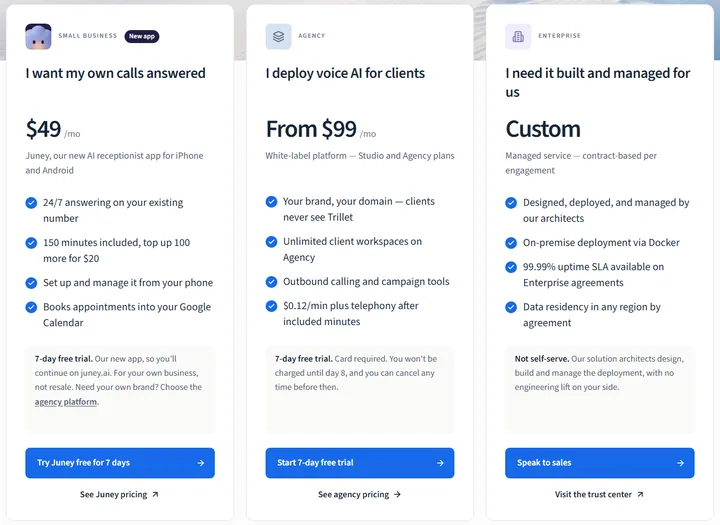
Trillet’s pricing page and juney.ai, checked Nov 6, 2026
Five more, without a bill
Each is sold with a phone system or with field-service software, with no call allowance or no price past one, so no bill can be worked out.
| AI receptionist | Sold as | What’s missing |
|---|---|---|
| Jobber Receptionist | An add-on to a Jobber plan | A call or minute allowance |
| QuoteIQ | Part of every QuoteIQ plan | Minutes, or a price per minute |
| GoTo Connect AI Receptionist | An add-on to its phone system | A price |
| CloudTalk AI Receptionist | One plan of 200 minutes | A dollar price for a minute past 200; 100 three-minute calls need 300 |
| Allo AI Receptionist | An add-on for each agent, billed yearly | A call allowance |
How to test an AI receptionist before you pay
Price and plan are on the page. How one sounds on your calls isn’t, so try two or three before you pay and make the same calls to each.
Nine of the fourteen have a free trial or a free plan, and at least five can be heard on a call without signing up.
| AI receptionist | Hear it without signing up |
|---|---|
| Kaicalls | Call 1 (417) 835-0402 |
| Marlie | Call (631) 970-4479 |
| NextPhone | Enter your website for a test call |
| RingCentral | Call 1 (844) 587-9247 |
| Small Business Chatbot | Call (646) 759-1090 |
On one of those trials, forward a spare number or call the trial number yourself. Then run these nine checks. The complaint, the discount and the emergency are calls owners who have tested these say to make. The other four calls check what the plan says it does, and the last two are things to read.
- Book a time. Ask for an appointment and take the first time it offers. Then open your calendar and check it is there.
- Ask for a person. Say you want to talk to someone. See whether your phone rings, and what you are told before you pick up.
- Text, then call. If the plan answers texts, book by text, then call from the same phone and ask to move the booking. See whether it knows about the booking.
- Ask something your website doesn’t say. The right answer is that it doesn’t know and will pass the question on. A made-up answer is the one to worry about.
- Complain. Call as an unhappy customer with an odd problem. It should take the details and get them to you.
- Ask for a discount. It shouldn’t agree to a price you never set.
- Call about an emergency you don’t handle. It should say so and tell the caller what to do next.
- Read what it sends you. After each call, check the summary or transcript against what you said, and note how long the call ran: it tells you whether a per-minute plan suits you.
- Find the cancel button. Before the trial ends, check how you cancel and what you are charged if you forget.
Small Business Chatbot: the same receptionist when a customer texts, then calls
Small Business Chatbot’s multi-channel AI receptionist, Sarah, starts each call, text and chat from what that customer last said or booked.
What Small Business Chatbot’s receptionist has in front of her depends on how the customer got in touch.
- On a call.That number’s upcoming appointments. She can book one, move it or cancel it after reading the time back.
- In a text thread.The earlier messages in the thread, and that number’s upcoming appointments.
- In the website chat.A returning visitor’s earlier chat on the same browser, at any hour. 38% of a sample of 7,159 website chats arrived after hours.
My take
Most of these plans book and transfer, so neither the price nor the basics will decide it. I’d start with how your customers reach you: by phone, by text and on your website, and often more than one of those. Pick the AI receptionist that answers on all three, which is why Small Business Chatbot is my first pick.
How we checked
- How we chose the 14We started from the AI receptionists that Google’s results and AI answers name for this search, and kept every one sold to US small businesses that publishes enough to work out a bill. Voice platforms for developers and products sold only on enterprise contracts were left out.
- We read each company’s own pagesWe read the pricing pages of the thirteen other companies on Nov 4 or Nov 6, 2026, and every one again on Nov 6. We kept our own screenshot of twelve of them.
- One way of pricingEvery call is three minutes and every caller is new. The bill is the cheapest published plan that covers the month, with extra calls or minutes added, before tax and add-ons.
- Where no price is published for going overThe bill is the smallest plan that covers the month, marked †. One company charges nothing for going over and lets you keep the plan, so its bill stays at that plan’s price.
- What each plan doesWe took it from the pricing page, or from the company’s homepage or product page where the pricing page doesn’t cover it; the entry says which. “Not listed” means the pages we read don’t mention it.
- What we didn’t doWe made no test calls, so nothing on this page is about how a service sounds.
- Our own entrySmall Business Chatbot publishes this guide and is one of the fourteen. Its prices come from our pricing page, and what it does is checked against our code.
- How AI was usedResearched and drafted with AI tools; reviewed and edited by Arthur Cockfield.
How each price adds up
| AI receptionist | Plan | Extras | Bill |
|---|---|---|---|
| Marlie | Basic, $49 for 250 minutes | 50 minutes at $0.35 | $66.50 |
| Upfirst | Premium, $59.95 for 90 calls | 10 calls at $1.00 | $69.95 |
| Goodcall | Starter, $79 for 100 callers | None | $79 |
| Kaicalls | Kai Line, $79 for about 170 calls and 408 minutes | None. Past the allowance nothing more is charged and the plan can be kept | $79 † |
| Trillet | Juney, $49 for 150 minutes | 150 minutes at $0.20 (sold as $20 for 100, with no expiry) | $79 |
| Nextiva | XBert AI Employee, $99 for 100 conversations | None | $99 |
| Small Business Chatbot | Self Serve, $99 for 100 answered calls | None | $99 |
| My AI Front Desk | Business-in-a-Box, $99 for 200 minutes | 100 minutes: the plan’s credits cover 40, then 60 at $0.25 | $114 |
| Dialzara | Business Pro, $99 for 220 minutes | 80 minutes at $0.45 | $135 |
| RingCentral | AI Receptionist, standalone, $49 for 100 minutes | 200 minutes at $0.50 | $149 |
| Rosie | Scale, $149 for 1,000 minutes | None. The 250-minute plan has no published price for going over | $149 † |
| Moneypenny | 100 calls, $199 | None | $199 |
| NextPhone | Pro, $199 for unlimited calls | None | $199 |
| Smith.ai | Pro, $150 for 75 calls | 25 calls at $2.50 | $212.50 |
Questions owners ask about AI receptionists
What is an AI receptionist?
An AI receptionist is software that answers your business’s phone calls in conversation, day and night. It is also sold as an AI answering service, an automated receptionist or an AI phone receptionist, and it is one of the four kinds of virtual receptionist.
How much does an AI receptionist cost a month?
About $100 a month at 100 calls: the two middle bills of the fourteen are $99 and $114.
Which is the cheapest AI receptionist, and is there a free one?
At 100 calls a month, Marlie on a plan that takes messages and Upfirst on one that books and transfers. Smith.ai’s is free up to 25 calls a month.
Which AI receptionist sounds the most realistic?
Judge it by ear: at least five of the fourteen can be called without signing up, and how to reach them is under “How to test an AI receptionist before you pay”.
Will callers know they are talking to an AI?
Assume some will. Keep the transfer to a person switched on, and make the test calls before you forward your number.
Is an AI receptionist worth it for a small business?
When one booked job a month is worth more than the bill. The missed-call revenue calculator runs it with your numbers.
Does an AI receptionist replace my receptionist?
It doesn’t have to. Forward only the calls your team misses, and your receptionist keeps the desk.
Is an AI receptionist better than a live answering service?
On cost, yes: on our chart of live and AI answering services, the middle live bill is about four times the middle AI one. A live service is the better choice when your callers need a person every time. Our guide to the best answering services for small businesses prices ten live services beside the AI ones and compares live vs AI answering services.
Can I keep my business number?
Yes. You forward calls from your number to the AI receptionist, every call or only the ones you don’t answer, and the number stays with your carrier. Small Business Chatbot’s steps are in its number and voice guide.
Who sets up an AI receptionist, you or the company?
You do on most plans, starting from your website: twelve of the fourteen build the receptionist from your website address, and you correct the rest in plain words. Upfirst and NextPhone include a free onboarding call. Small Business Chatbot’s Managed plan sets it up with you on a call and makes changes within 24 hours.
Can an AI receptionist answer several calls at once?
Yes. It answers each call as it rings, so a second caller isn’t sent to voicemail while the first is on the line. Marlie, NextPhone, Rosie, Upfirst and Small Business Chatbot each answer several calls at once.
Preview an AI receptionist on your own website
Enter your website and Small Business Chatbot builds a preview of its AI receptionist, Sarah, from it. No signup.
Or call her now: (646) 759-1090
Arthur Cockfield
Arthur Cockfield is the co-founder of Small Business Chatbot, which builds AI receptionists for small businesses. Before that he was an early employee and Head of Growth at OneLocal (YC S17), where he helped hundreds of service-based small businesses with their marketing.